A good trade show demo script shows one benefit your booth can prove, in full spoken words that any staff member can say. It runs in five short beats over about three minutes. It covers seven common visitor branches, has a fallback for every likely failure and ends with a next step the visitor agreed to.
Most booth teams get talking points instead. A slide of features, a few product facts and a reminder to scan badges. Then the show floor opens, a visitor asks something nobody planned for, and three people give three different answers.
This guide fixes that. You get a simple way to choose the one benefit, a five-beat script you can copy, lines for seven kinds of visitors and a table of fallbacks. You also get a note format and follow-ups that never promise a meeting nobody booked.
The job a trade show demo script has to do.
A booth demo is not a sales presentation squeezed into a smaller space. The visitor is standing, distracted and usually on the way somewhere else. They give you a few minutes at most, and they decide in the first seconds whether to stay.
So a trade show demo script has a narrow job. It should do four things.
- Earn a few minutes of attention with a question the visitor can answer quickly.
- Show one useful result they can see with their own eyes.
- Find out whether there is a real fit without turning the booth into an interview.
- Agree on one next step that your team can deliver after the show.
Notice what is missing. The script does not try to cover every feature, close a deal on the spot or collect as many badge scans as possible. Those goals push staff to talk longer and promise more, which is where booth demos usually go wrong.
The other job of the script is consistency. When everyone on the team says the same words, you can tell which lines work. If one person improvises, you learn nothing about the demo. You only learn about that person.
Pick one benefit your booth can prove.
The hardest part of the script is choosing what to leave out. Most products do many things, and the team wants to show all of them. A crowded demo leaves the visitor with no clear memory of any of them.
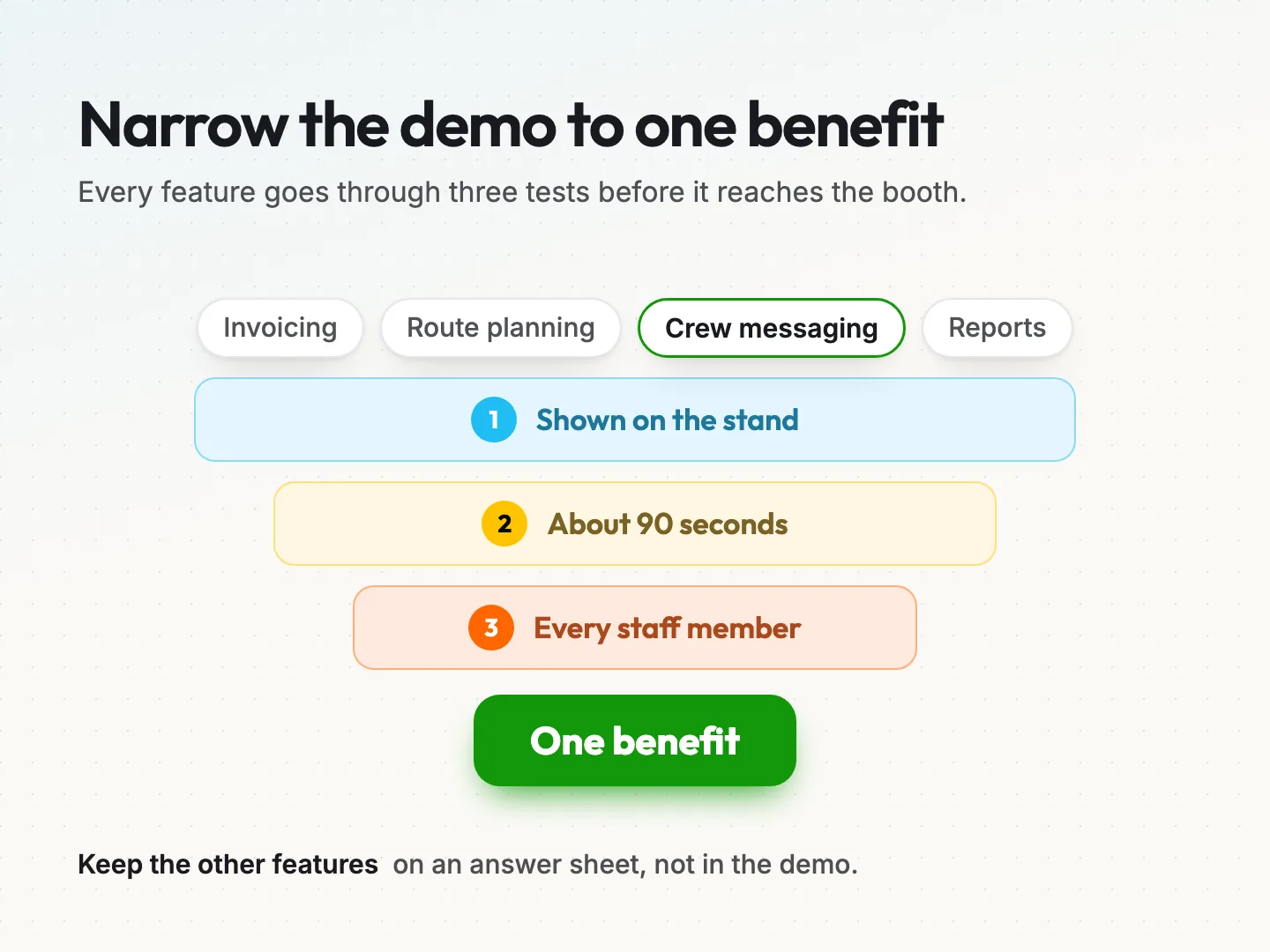
Pick one benefit. Write it as a result for the visitor, not a feature of the product. “Schedules jobs from one screen” is a feature. “Your crew sees tomorrow’s jobs before they leave the yard” is a result.
Then put the benefit through three tests.
- Can you show it on the stand? If the result needs a week of data or a site visit, it is the wrong benefit for a booth.
- Can you show it in about 90 seconds? Longer than that, and people standing in an aisle drift away.
- Can every staff member support it? If only your most technical person can answer the follow-up questions, the demo falls apart on their break.
A benefit that passes all three tests is the one to build the script around. Keep the other features in a short answer sheet for visitors who ask. They are not part of the demo.
Hypothetical example: a small company sells scheduling software to landscaping firms. Its list includes invoicing, route planning, crew messaging and reports. Route planning fails the stand test, because it needs real addresses. Crew messaging passes all three, so the demo shows a job change reaching a crew phone in real time.
Your booth graphics should say the same thing. If the banner lists eight features and the demo shows one, the visitor gets two messages. If you are planning new trade show banners, write the demo benefit first and let the banner headline repeat it.
Write the spoken words in five beats.
Talking points let each person fill the gaps differently. Spoken words do not. Write the script the way people talk, with short sentences and contractions, and read it aloud until it sounds natural.
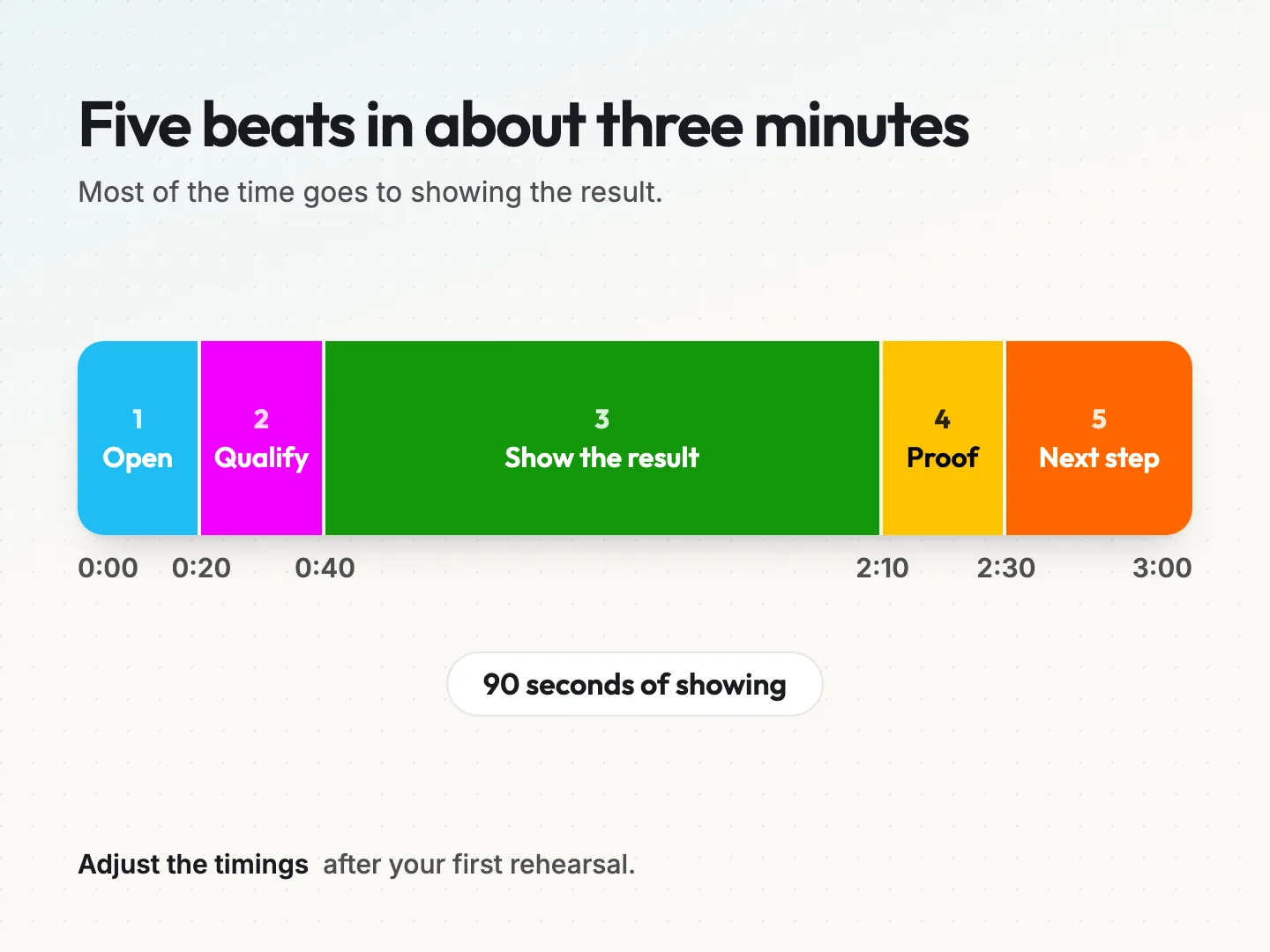
The script has five beats. The timings below are a starting point for a three-minute demo, not a rule. Adjust them after your first rehearsal.
Beat 1: Open with a question (0:00 to 0:20).
Ask a question the visitor can answer in a few words and that connects to your benefit. Avoid “Can I help you?” because the easy answer is no.
*”Quick question. How does your crew find out when a job changes during the day?”*
Beat 2: Qualify in one line (0:20 to 0:40).
Listen to the answer, then ask one short follow-up that tells you whether to go on. This is not a discovery call. You only need enough to choose the right branch.
*”Roughly how many crews do you send out on a busy day?”*
Beat 3: Show the result (0:40 to 2:10).
Show the one benefit. Narrate what the visitor is seeing in plain words and hand them the device if you can. Keep your hands off the screen as much as possible.
*”Here’s a job on today’s board. I’ll move it to the afternoon. Now look at this phone. That’s what your crew lead sees, right away.”*
Beat 4: Give one proof point (2:10 to 2:30).
Back the result with something you can stand behind. That could be a short fact about how the product works, a written policy your company already has or an approved customer quote. Never invent a figure for the booth.
*”The change shows up on every phone on that crew, so nobody is working from an old list.”*
Beat 5: Agree on the next step (2:30 to 3:00).
Offer one or two next steps and let the visitor choose. Write down exactly what they agreed to. If they say no, thank them and let them go.
*”Would it help if I sent you a short video of this, or would you rather someone call you next week to set up a trial?”*
If your demo uses slides or a looping screen, keep them to the one benefit too. Good presentation design helps here, because a busy slide fights the person talking in front of it.
The booth script template you can copy.
Copy this table into a document and fill in the third column with your own words. Keep each line short enough to say in one breath. Add the staff action so new team members know what their hands should be doing.
| Beat | Time | Your words | Staff action | Pass signal |
|---|---|---|---|---|
| 1. Open | 0:00 to 0:20 | One question tied to your benefit | Face the aisle, step half a pace forward | The visitor answers |
| 2. Qualify | 0:20 to 0:40 | One short follow-up question | Listen, pick the branch | You know which branch to use |
| 3. Show | 0:40 to 2:10 | Three to five lines narrating the result | Hand over the device or point to the screen | The visitor sees the result |
| 4. Proof | 2:10 to 2:30 | One fact, policy or approved quote | Pause, let them ask | No made-up numbers |
| 5. Next step | 2:30 to 3:00 | Two options, the visitor picks one | Write the agreed step in the notes | A clear yes, or a polite no |
Under the table, add three lines for every script.
- The one benefit, written as a result for the visitor.
- What we never say, such as prices you have not approved, delivery dates you cannot keep or claims about competitors.
- Who to call over, meaning the person on shift who handles technical or pricing questions.
Print a copy for every staff member and keep one at the stand. A laminated card is easier to glance at between visitors than a phone.
Seven visitor branches and what to say.
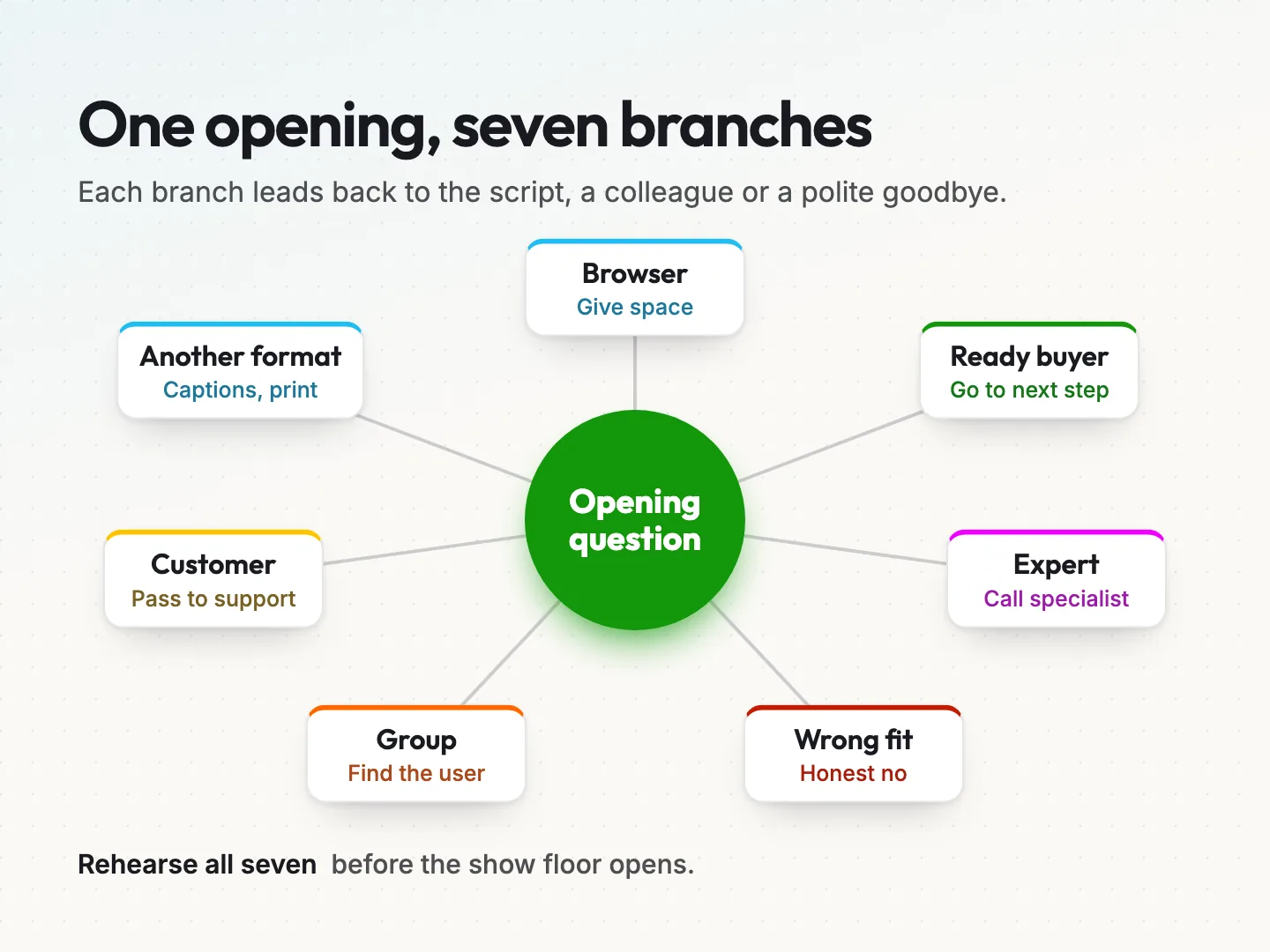
Not every visitor follows the five beats. A branch is a short, prepared response for a common type of visitor. Each one sends the conversation back to the script, to a colleague or politely out of the booth.
These seven branches cover most of what happens at a busy stand.
1. The browser who is just looking.
Many people want to look before they talk. Give them space and one easy way in.
*”Take your time. If you want to see it move, just say and I’ll show you in a minute or two.”*
2. The ready buyer.
Some visitors already know what they want. Skip the long show and go to Beat 5.
*”Sounds like you’ve done your homework. The fastest next step is a call with our lead on this. Can I take your details and the best day to reach you?”*
3. The expert who interrupts.
Technical visitors may ask a detailed question in the first ten seconds. Answer briefly if you can, then offer the right person.
*”Good question. The short answer is yes. Our specialist can go deeper. She’s free in about ten minutes. Want to wait, or shall I set up a call?”*
4. The wrong fit.
If the product clearly will not help, say so kindly. It saves both of you time, and an honest no is remembered well.
*”Honestly, this is built for teams with crews in the field. It probably isn’t right for you, but the stand two rows over might be.”*
5. The group.
When three or four people arrive together, find out who decides. Run the demo for the whole group, but ask the qualifying question to that person.
*”Happy to show all of you. Who’s the one who’d be using this day to day?”*
6. The existing customer with a problem.
Never fix account issues in the aisle while others wait. Listen, write down the problem and name who will contact them.
*”I’m sorry that’s happening. Let me write down exactly what you’re seeing, and I’ll pass it to our support lead today.”*
7. The visitor who needs the demo another way.
Some visitors cannot see the screen, hear you over the floor noise or stand for long. Offer another format without fuss. Have a chair, a printed walkthrough and a captioned video ready.
*”It’s loud here. Would it be easier to watch this with captions, or read a printed walkthrough?”*
Under the Americans with Disabilities Act, businesses that serve the public must communicate effectively with people who have vision, hearing or speech disabilities. The ADA.gov effective communication guidance, last updated February 28, 2020, lists aids such as written materials, large print and captioning. It is general guidance, not legal advice for your booth.
Fallbacks for when the booth demo breaks.
Trade show floors are hard on technology. Venue Wi-Fi gets crowded, power strips fail and screens glare under the lights. Plan the fallback before the show, so staff are not inventing one while a visitor waits.
| What breaks | First fallback | Second fallback |
|---|---|---|
| Venue Wi-Fi or app login | Run the demo offline or on a phone hotspot | Play a short recorded video of the same result |
| The screen or tablet | Use a spare device kept charged at the stand | Walk through a printed version of the same screens |
| Floor noise | Move to the quieter corner of the booth | Use the captioned video and point as you talk |
| A crowd forms | Run one demo for the group | Offer a set time later in the day |
| Your demonstrator is on break | A second trained person runs the same script | Book a callback using the notes card |
| Visitor needs another format | Seat them and slow the pace | Hand over the printed walkthrough or large print |
Test each fallback once before the show. A recorded video that needs a login, or a hotspot nobody knows the password for, is not a fallback.
Keep the printed walkthrough short. Three or four screenshots with one line each is enough. It also doubles as a leave-behind for visitors who want to think it over.
Staff the booth around the script.
A script only works if the right people are at the stand when it is needed. Even a small booth benefits from three simple roles, and one person can cover two of them on quiet hours.
- Greeter. Stands at the aisle, asks the opening question and hands promising visitors to the demonstrator.
- Demonstrator. Runs Beats 3 to 5 and knows the branches well.
- Note-taker. Writes the notes card for each serious conversation and checks the agreed next step.
Plan shifts so nobody runs demos for hours without a break. Tired staff speed up, skip the qualifying question and start promising things. A schedule written down before the show is easier to keep than one made up on the floor.
Body language matters too. Staff who guard the booth edge or cluster in a corner make the stand feel closed. Open posture and a stand that feels easy to walk into give your script a chance to start.
Before the show, give every staff member the script card, the answer sheet and the list of things you never say. Then rehearse together, which is covered at the end of this guide.
Capture notes your follow-up can use.
A badge scan tells you who someone is. It does not tell you what they wanted. If the follow-up only has the scan, your email has to guess, and guessing reads as generic.
Use a short notes card, on paper or in your lead app, with five fields.
- Branch. Which of the seven branches the visitor took.
- What they asked. Their question in their own words, if you can.
- What they saw. Whether they saw the full demo, the video or the printed walkthrough.
- Agreed next step. Exactly what they said yes to, such as “send the video” or “call next week”.
- Owner. The name of the person who will do that next step.
Fill in the card right after the visitor leaves, not at the end of the day. Details fade quickly on a busy floor.
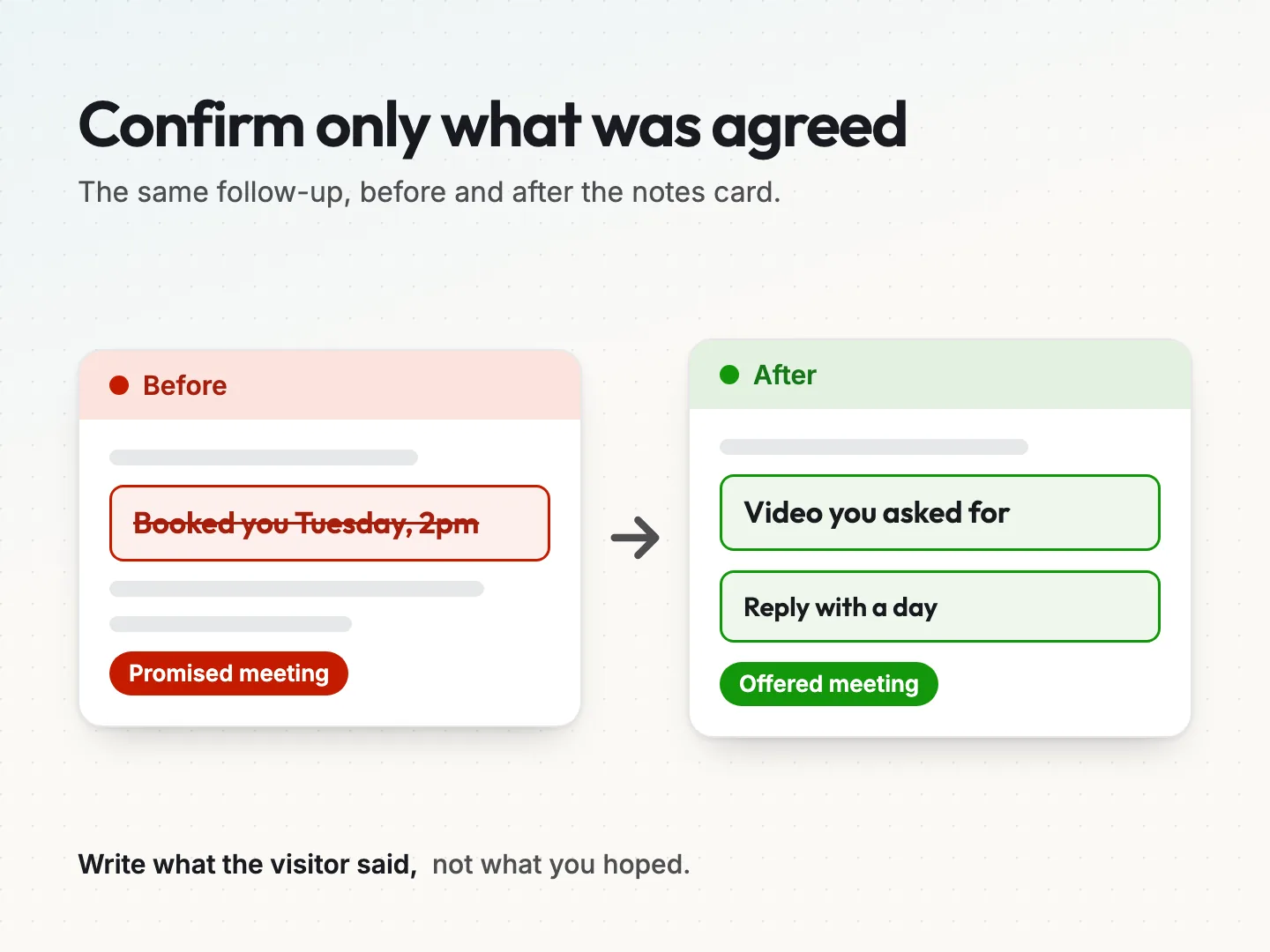
Be careful with the agreed next step field. Write what the visitor said, not what you hoped. “Interested in a demo” is a hope. “Asked for a call on Tuesday afternoon” is an agreement. The difference decides how your follow-up should read.
Prepare follow-up questions that build on the booth conversation.
Follow-ups that never promise an unconfirmed meeting.
The most common follow-up mistake is writing as if a meeting were already booked. “Great to meet you. Looking forward to our call on Thursday.” If nobody agreed to Thursday, the visitor is confused or annoyed, and your team has a slot on the calendar nobody will attend.
A safer rule is simple. The follow-up confirms only what the notes card says. Everything else is an offer the visitor can accept or ignore.
Hypothetical before: “Thanks for stopping by. I’ve booked us in for a demo next Tuesday at 2pm.”
Hypothetical after: “Thanks for stopping by and asking how crew updates work. Here’s the two-minute video you asked for. If a call would help, reply with a day that suits you.”
Match each follow-up to the branch.
- Browser. A short thank-you and the leave-behind. No pressure.
- Ready buyer. Confirm the call they agreed to, with the name of the person calling.
- Expert. Send the technical answer you promised and offer the specialist.
- Wrong fit. Usually nothing, unless they asked to stay in touch.
- Group. Send to the decision maker and offer to share with the rest.
- Existing customer. Pass it to support the same day and tell them who has it.
- Another format. Send the captioned video or the walkthrough they used.
Send the follow-ups while the conversation is still fresh, and within the window your team can handle. A few honest emails sent on time beat a pile of generic ones sent a week late.
The rules still apply to booth contacts. The FTC’s CAN-SPAM compliance guide, dated August 2023 and edited January 2024, says the law has no exception for business-to-business email. Marketing emails need accurate headers, an honest subject line, a postal address and a working opt-out. This is a summary of general guidance, so check your own situation.
Match each follow-up email to what the attendee asked about.
Rehearse the script before the show floor opens.
A script nobody has said out loud is still a draft. Book an hour before the show and run it as a team. One person plays the visitor while another runs the demo and a third watches with the template.
Run each of the seven branches at least once. Then break something on purpose. Turn off the Wi-Fi, hand the demonstrator a dead tablet or play loud background noise from a phone. Watch whether the fallback happens without a long pause.
Score each run against the pass signals in the template.
- Did the opening question get an answer?
- Did the demonstrator choose a branch after the qualifying question?
- Did the visitor see the result within about 90 seconds?
- Was the proof point something the company can stand behind?
- Did the notes card record an agreed next step, in the visitor’s words?
Fix the lines that stumble. Cut any sentence people trip over twice. A script gets better each time someone says it, so expect to change a few lines after the first morning of the show.
After the event, look at the notes cards. Which branches came up most? Which next steps turned into real conversations? Use that to rewrite the script before the next show, rather than starting from scratch.
Final thoughts.
A booth demo works when it is small enough for every staff member to deliver well. One benefit, five beats, seven branches, a fallback for each likely failure and a follow-up that only confirms what the visitor agreed to. None of it needs a big budget. It needs an hour of writing and an hour of rehearsal.
Start with the template above. Write your one benefit at the top, fill in the spoken words and rehearse it with the people who will stand at the booth. Then make sure your banners, slides and follow-up emails all say the same thing.
If you want help turning your demo, booth graphics and follow-up into one clear message before your next show, talk to a specialist and tell us the date of your event.
Was this article helpful?