For a business owner, personal branding on social media means using your own profile to show what you know and how you work, then pointing people to the company page and website. It is not about followers. A clear headline, a few steady topics, honest replies and a working link do most of the job.
One thing to know before you start. Most platforms keep a person’s profile and a business’s page as separate accounts. Your profile is you. The company page is a business account that speaks for the company. They do different jobs, and this guide shows how to make them work together.
You will learn what to be known for and how to set up LinkedIn and Facebook so they point to the business. You will also see how to keep your profile and website in agreement, and how to tell whether any of it brings in work.
What personal branding on social media means for an owner.
A personal brand is what people remember about you after they have seen your work, read your posts or talked with you. You already have one. Every buyer who looks you up before a call forms an opinion from whatever they find.
Personal branding is the work of making that impression clear and accurate. For an owner, the audience is small and specific. It is the people who buy from your company, the partners who refer work to you and the people you might hire.
That changes the goal. You are not trying to reach everyone. You are trying to make sure that when the right person checks your profile, they see someone who knows the field, explains things plainly and runs a real business they can contact.
Think of the moment before a first meeting. A buyer has your name from a referral. They search for you, glance at your profile and read one or two recent posts. If what they see matches what the referral said, the meeting starts warmer. That is the whole point.
What it is not.
Personal branding for an owner is not becoming an influencer. You do not need a large following, a louder persona or a camera in your face every day.
It is also not oversharing. Your family, your bad week and your private opinions on every topic are not required. A clear professional point of view, shared steadily, does more for the business than a stream of personal updates.
And it is not daily posting. Frequency matters far less than being consistent and useful. One good post a week, plus real replies, beats seven rushed ones.
How your profile supports your company brand.
Your profile and your company brand are related, but they are not the same thing. The company brand is the name, look, promise and reputation of the business itself. If you are still shaping that, start with our guide on how to build a brand for your business.
Your personal brand sits in front of the company brand. People trust people before they trust logos, so your profile often gets the first look. Its job is to earn trust and then hand the visitor on to the company.
Picture it as a relay. Each step carries the visitor a little further and passes them to the next.
- A post earns attention. Someone sees a useful post of yours in their feed.
- Your profile builds trust. They click your name and see who you are and what you do.
- The company page confirms the business. They see a real company with a team and a track record.
- The website answers questions. They read about the service that fits their problem.
- The inquiry starts the conversation. They fill in a form, call or send a message.
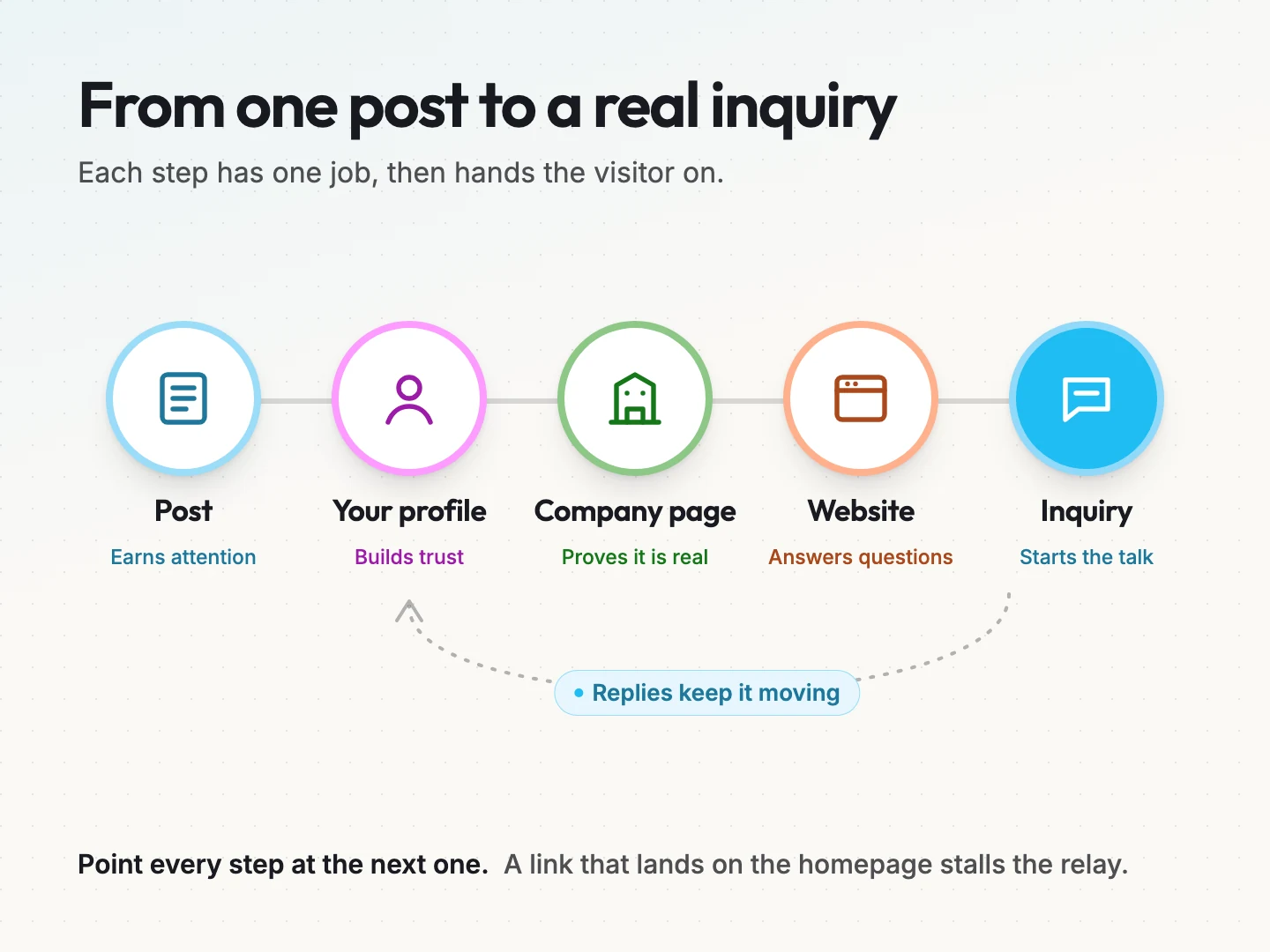
Replies keep the relay moving. A thoughtful answer to a comment often does more than the post itself, because it shows how you treat people.
The handoff only works when each step points to the next one. A profile with no link to the company stalls the visitor. A link that lands on the homepage, when the post was about one service, makes them hunt.
Here is how the work divides between the three places.
| Place | What it shares | Main job |
|---|---|---|
| Your profile | Your view, lessons from the work, answers to common questions | Earn trust in you |
| Company page | Team news, project highlights, hiring, service updates | Confirm the business is real |
| Website | Service details, proof, process and a contact route | Turn interest into an inquiry |
Decide what you want to be known for.
Before you touch a profile setting, decide what you want people to remember. Your headline, your featured posts and your topics all depend on this answer. Skipping it is why many owner profiles read like a job title and nothing more.
Write one positioning sentence.
Use this pattern: “I help [who] decide [what] without [obstacle].” It forces you to name a reader, a decision and a problem.
The sentence is for you, not for your headline. It keeps your posts pointed in one direction. If a post idea does not serve that sentence, it probably belongs somewhere else or nowhere at all.
If you find the sentence hard to write, that is useful information. It often means the company’s own messaging is not settled yet. Our brand messaging service exists for exactly that gap.
Pick three themes from questions you already hear.
Good themes sit where three things overlap: what you know well, what buyers ask and what you are willing to share in public. A topic that misses any one of the three will not last.
The easiest source is your own week. Write down the questions customers ask on sales calls, in emails and after a job is done. Group them. Most owners find that three groups cover almost everything.
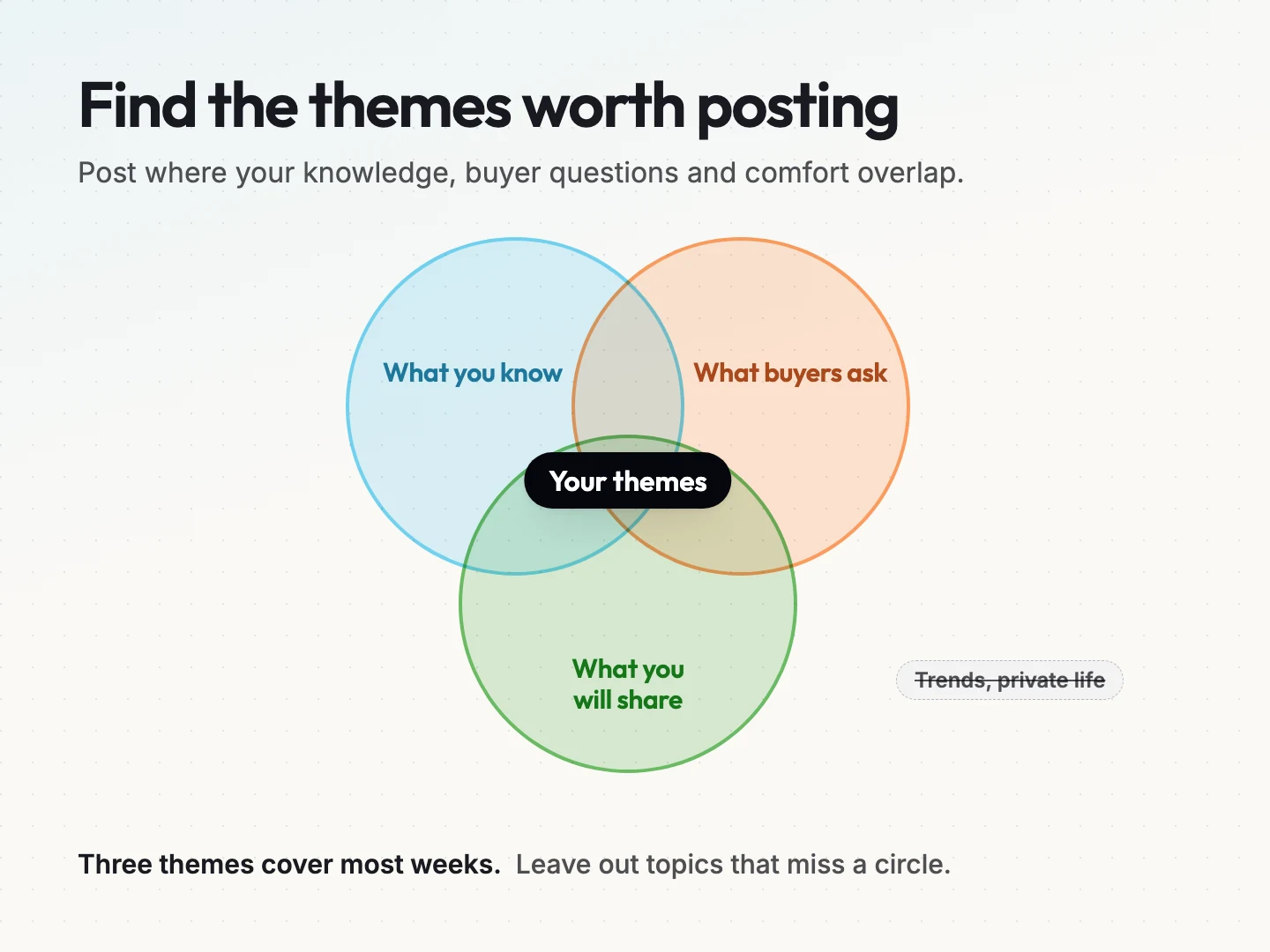
Leave out the rest. Trend commentary, hot takes on news and your private life rarely help buyers decide anything. They can also pull your profile away from the company it is meant to support.
A hypothetical example.
Here is a hypothetical owner of a small residential landscaping company. The business and details are invented for illustration.
- Positioning sentence: “I help homeowners decide what their yard needs without paying for extra work.”
- Theme one, plant choice: which plants survive local heat and which ones need replacing every year.
- Theme two, upkeep: what a realistic maintenance schedule looks like by season.
- Theme three, reading a quote: how to compare two landscaping quotes line by line.
Every theme answers a question this owner hears weekly. None of them requires sharing anything private. And each one leads naturally to a service page on the company website.
Set up your profile so it points to the business.
With your positioning settled, you can set up the profile itself. The steps below cover LinkedIn and Facebook, because those are where many owners already have accounts. The same thinking applies anywhere.
Pick one primary platform first.
Go where your buyers already spend time. A firm that sells to other businesses often finds its buyers on LinkedIn. A local consumer business may find more of its customers on Facebook. If you are unsure, ask a few recent customers where they would look you up.
Choose one primary platform and do it well before adding a second. Two half-finished profiles send weaker signals than one complete one.
LinkedIn setup for owners.
These steps come from LinkedIn’s own Help Center, opened on 11 October 2026. Menus and features change, so check the linked page if a step looks different.
Link your role to the company Page. When you add your position in the Experience section, pick the company from the dropdown list. LinkedIn’s help article on company name and logo in your Experience section says the Page’s logo and name then appear beside your position. If the company has no LinkedIn Page, no logo shows. That page was last updated five years ago, according to LinkedIn.
If the Page was created after you added the role, edit the position and select the company again so the logo appears. A company page also helps your team, because they can link their roles to it too.
Only link real roles. LinkedIn’s profile experience association guidelines say the link should reflect real professional experience with that organization. Examples include employment, contract work or board service. Being a customer of a company does not count. The guidelines were last updated four years ago.
Add your website to Contact info. LinkedIn’s help article on adding a website to your profile says you can show up to three website links. They appear in the Contact info part of your intro section. That article was last updated two years ago. Use one of the three for the service page your posts talk about most, not only the homepage.
Know that the intro link is a paid feature now. LinkedIn says it removed the option to add a hyperlink to your profile through the old creator setting. A custom button that links to a site of your choice now needs Premium Business, Sales Navigator or Recruiter. That page was last updated one year ago.
You do not need the button for this to work. Contact info and your posts can carry the link.
Facebook setup for owners.
Facebook has a professional mode, which it calls pro mode, for personal profiles. Facebook’s help article on how to turn pro mode on or off for your Facebook profile shows no date. We opened it on 11 October 2026.
According to that page, turning pro mode on adds content and audience insights to your existing profile. It also sets “Who can follow me” to Public, so people who are not your friends can follow you.
Turning it off changes “Who can follow me” back to Friends. Followers who are not your friends are removed, and your insights are no longer available. Decide before you switch it on whether you are ready for a public audience on that profile.
If you would rather keep your Facebook profile private for family and friends, that is a fair choice. Let the company page carry the business on Facebook, and put your own effort into one other platform.
Make your profile, company page and website agree.
A visitor who moves from your profile to your website should feel they are in the same place. Mismatched names, old photos and different service lists make people wonder which version is true.
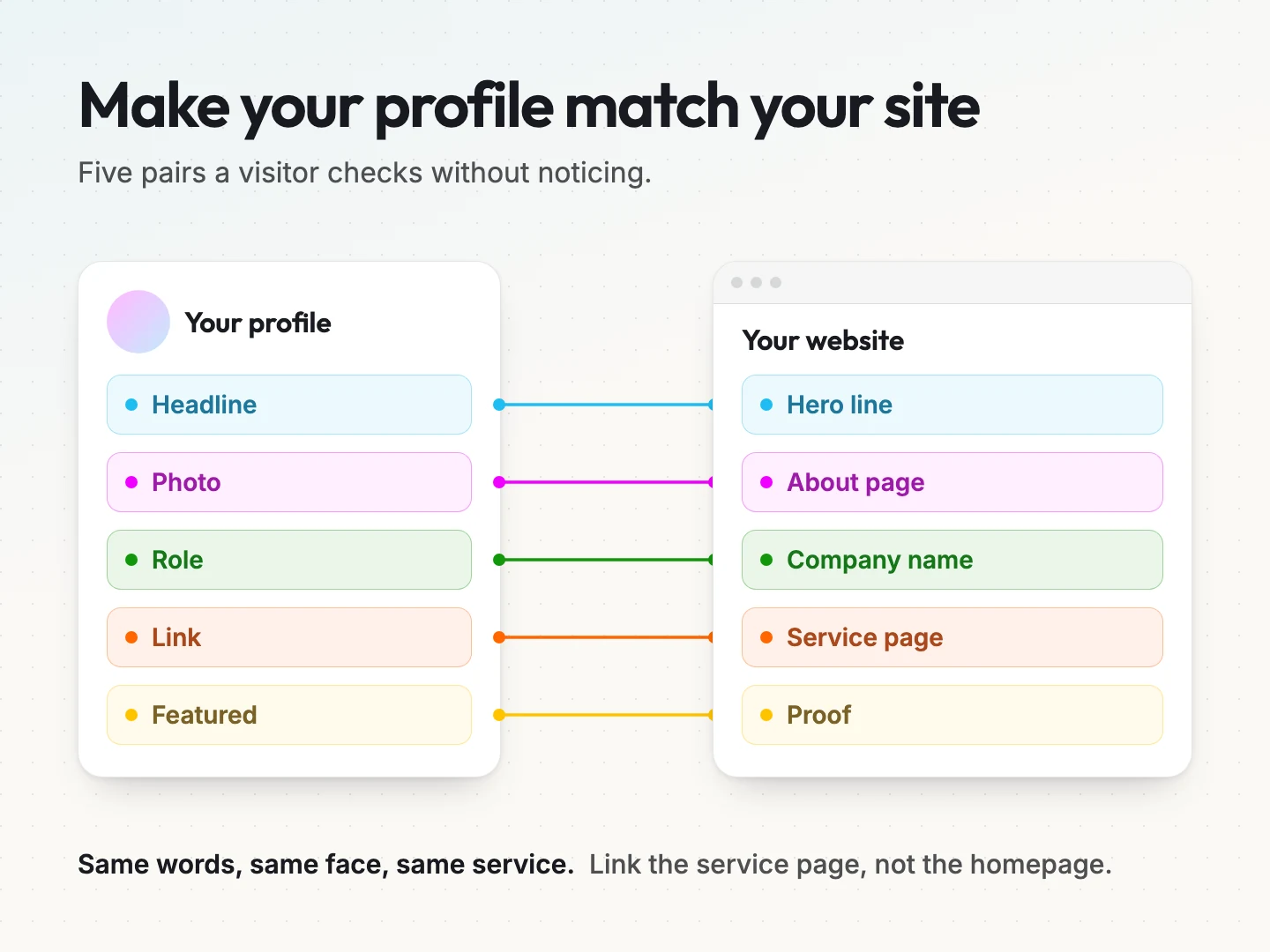
Run through this checklist once now and again whenever the business changes.
- Headline and hero line. Your profile headline, the short line under your name, should describe the same work as the website’s main line.
- Photo and About page. Use a recent photo that also appears on the team or About page, so people know they found the right person.
- Role and company name. Your title and the company name should match the website and the company page exactly.
- Link and service page. The link on your profile should go to the service page your posts discuss, not only the homepage.
- Featured item and proof. If you pin a post or feature an item, choose one that the website backs up with a case story, a review or a clear process.
- Contact route. The way people reach you on the profile should lead to a real person who answers.
The link rule matters most. When a post talks about one service and the link drops people on the homepage, many of them leave before they find it.
A weekly routine that fits an owner’s calendar.
Owners do not have spare hours. The routine has to fit inside a normal week, or it will stop within a month.
Block one fixed time each week. Many owners find that 30 to 60 minutes is enough to start, but pick a length you can keep. Treat it like a client meeting you cannot move.
Use the block for four small jobs.
- Add to your idea bank. Keep a running note of questions from sales calls, support emails and job sites. These become posts.
- Write one post. Pick one question and answer it in plain words. Short is fine.
- Reply to comments. Answer every real comment on your own posts within a day or two.
- Comment on others. Leave a thoughtful comment on a few posts from customers, partners or peers.
Replies and comments count as the work. They are often where real conversations start. A post nobody replies to still gives you something to point to later.
The idea bank keeps you from staring at a blank page. If one of your answers is worth keeping for years, turn it into a full article. Our guide to creating evergreen content covers how. If you want help planning topics across your profile, company page and website, see our content strategy service.
There is no universal posting frequency. A steady rhythm you keep beats a burst of daily posts followed by silence.
What to share and what to keep private.
Before you post, set a few boundaries. They protect your clients, your family and your team, and they save you from decisions made in a hurry.
Share these freely.
- Lessons from your work, without client names.
- Answers to questions customers ask.
- How your company does things, at the level a buyer would want to know.
- Opinions about your field that you can explain with reasons.
- Your team’s wins, with their permission.
Keep these private.
- Client names, logos or project details without written permission.
- Anything said on a sales or support call.
- Pricing disputes, complaints or staff issues.
- Your children, your home and your exact location.
- Opinions you would not defend calmly in a meeting with a customer.
Ask before you name work. Many clients are happy to be featured, but some have contracts or reasons to stay quiet. A short written yes protects both of you.
Be careful with screenshots too. A screenshot of a message, a dashboard or a document can show more than you meant. Crop it or describe it in words instead.
How to tell if your personal brand is helping the business.
Followers and likes are easy to see, but they do not tell you whether any of this brings in work. Look at signals that sit closer to an inquiry.
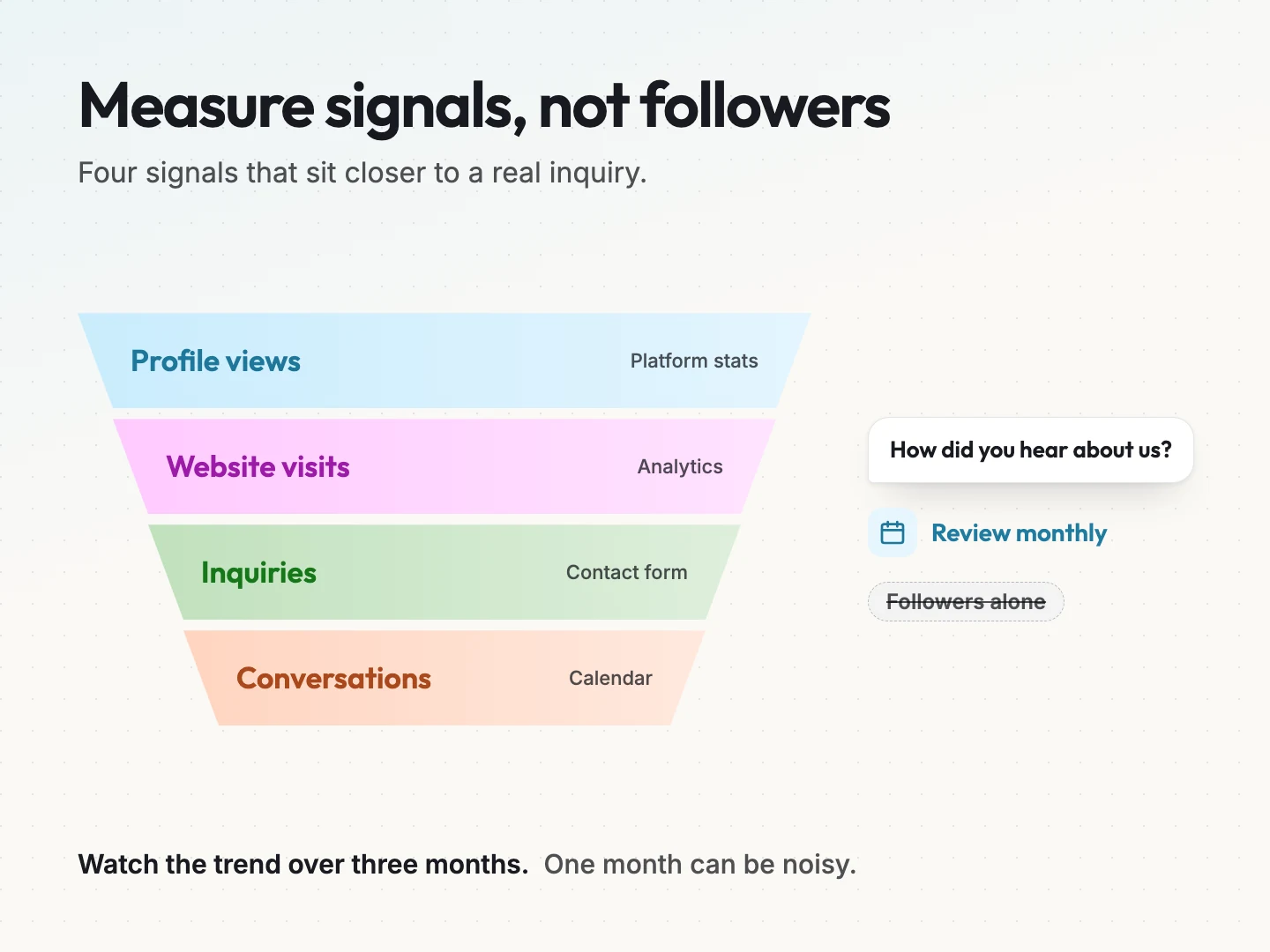
Track four signals, each from a source you already have.
- Profile views. Most platforms show you how many people looked at your profile. This tells you whether posts lead people to you.
- Website visits from the platform. Your website analytics tool reports where visitors came from. Visits that came from a social platform are often called referral traffic. Look for the platform’s name in that report.
- Inquiries that mention your posts. Add “How did you hear about us?” to your contact form, or ask it on the first call. Write the answer down every time.
- Conversations started. Count the direct messages, introductions and meeting requests that came from your profile.
Review these once a month, not daily. One month can be noisy. Look for the direction over three months.
Here is a hypothetical tracking sheet for the landscaping owner from earlier. The numbers are invented and round on purpose. They are not benchmarks.
| Month | Profile views | Visits from the platform | Inquiries that mention posts | Conversations |
|---|---|---|---|---|
| Month 1 | 120 | 15 | 0 | 2 |
| Month 2 | 140 | 22 | 1 | 3 |
| Month 3 | 180 | 30 | 2 | 5 |
The pattern matters more than any single number. In this example, more people visit the profile, more of them reach the website and a few inquiries now name the posts. That is the relay working.
If profile views rise but website visits stay flat, check your link and alignment. If visits rise but inquiries do not, the website page may need work. Our guide to website design that increases sales covers that part.
Build a brand that does not depend on you alone.
A strong owner profile has one risk. If every bit of trust runs through you, the business struggles when you take a holiday, step back or sell.
Plan for that from the start.
- Keep the company page active. Share project news, team updates and hiring posts there, not only on your own profile.
- Give team members a voice. Encourage the people who do the work to share what they know, in their own words, on their own profiles.
- Share themes, not scripts. Let the company’s three themes guide everyone, so the brand sounds consistent without sounding copied.
- Write the plan down. Note who looks after the company page and who answers messages if you are away.
A buyer who trusts the whole team, not only the founder, is easier to keep. If you are planning a handover or a sale, the company brand needs to stand on its own. Our brand strategy service helps with that shift.
Where a team or AI tools can help with your posts.
You do not have to do every step yourself. Some parts of the routine are easy to hand off. Others should stay with you.
These jobs suit a team member or an AI writing tool.
- Drafting from your notes. Give the tool your idea bank entry and ask for a first draft in your plain style.
- Repurposing. Turn one long article or talk into several short posts.
- Scheduling. Queue approved posts so they go out on your rhythm.
- Sorting comments. Flag the comments that need a real answer from you.
These jobs stay with you.
- Approving every post. Your name is on it, so you read it first.
- Writing replies. People can tell when a reply is automated. Answer real questions yourself.
- Saying no to a topic. Only you can decide what fits your positioning and your boundaries.
AI tools can draft quickly, but they cannot run your profile for you. They do not know your customers or your judgment. Use them for speed and keep the voice yours.
If you want a team to plan and run the company side, see our social media management service. For help writing posts that sound like you, see our social media copy service.
Final thoughts on building your owner brand online.
Personal branding on social media works best when it stays small and honest. Start with one platform, one positioning sentence and three themes drawn from questions you already answer. Link your role to the company, put the right page in your contact info and keep your profile and website in agreement.
Then give it time. Post on a rhythm you can keep, reply to people and check your four signals once a month. If the numbers move in the right direction, you have a trust step that hands buyers to your business.
If you want a second pair of eyes on how your profile, company page and website fit together, talk to a specialist at Scayver Graphix. We will look at where the handoff breaks and what to fix first.
Was this article helpful?