



A weekly social media content plan is a short list of the posts your team will publish next week, sized to the hours your team has. Every row holds the finished copy, the visual, the link, who makes it and who approves it. For many small teams that adds up to two to four strong posts a week, not seven.
That answer surprises people who grew up on “post every day” advice. Daily posting can work for a team with a full-time social manager. For an owner who also answers the phone, it usually ends the same way. Monday starts strong, Wednesday slips, and by Friday the account goes quiet until someone feels guilty.
This guide builds the week the other way around. You start with the hours you have, take out the time replies and reviews need, price each post by format and only then decide how many posts fit. You also get a weekly plan sheet you can copy, a filled hypothetical week and a five-day rhythm that keeps the plan moving.
The plan covers one week and one or two main channels. If you run more channels, build one sheet per channel first and merge them once the routine holds.
A post-every-day rule breaks small teams.
A posting rule tells you how many posts to publish. It says nothing about who makes them. That gap is where small teams get stuck.
Every post carries hidden work. Someone writes the caption, finds or designs the image, checks the link, waits for approval and schedules it. After it goes live, someone answers the comments and messages it brings in. A rule of seven posts a week multiplies all of that by seven.
When the hours run out, the work that gets cut is rarely the posting. It is the review, which is how typos and wrong prices go live. Or it is the replies, which is where customers talk to you. A plan that fits your hours protects both.
There is a second problem with daily rules. They push teams toward filler, the quick quote graphic or the “happy Monday” post, only to keep the streak alive. Three posts with a clear purpose usually do more for a small business than seven that exist to fill a slot.
So the first question for your weekly plan is not “how often should we post?” It is “how many hours do we have?”
Count the hours your team has for social media.
Start with an honest number. Ask everyone who touches social media how much time they can give it in a normal week, not a good week. Add those hours together. That total is your weekly social budget.
Be strict here. If the owner says three hours but spent one last week, write one. A plan built on wishful hours fails by Wednesday, and a failed plan teaches the team that planning does not work.
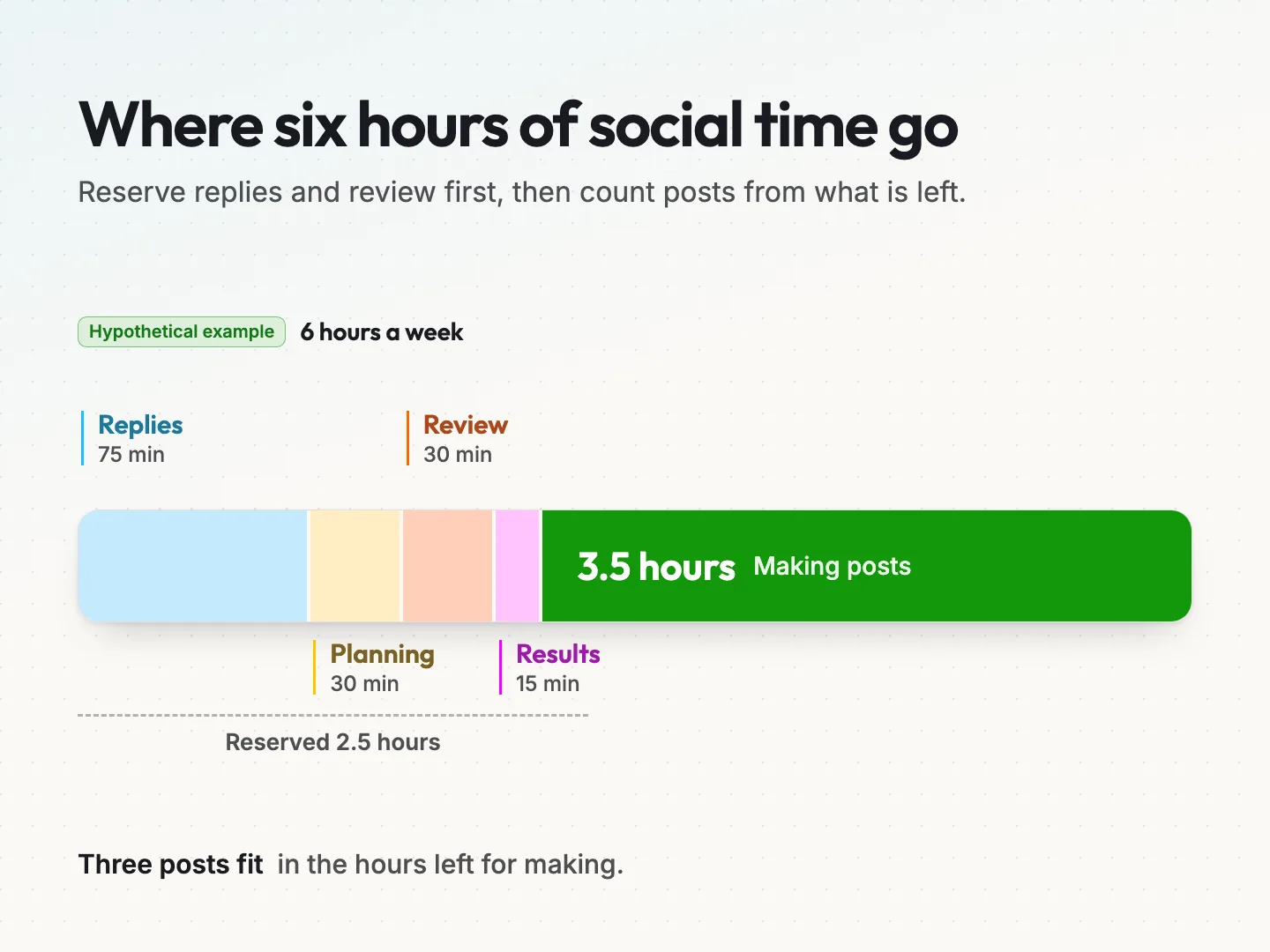
Here is a hypothetical example we will use throughout this guide. A small home services business has an office manager who can give social media 6 hours a week. The owner approves posts but does not make them.
Reserve time for replies first.
Replies are the part of social media where a customer is waiting on you. Book that time before anything else. An SBA blog post on social calendars suggested about 15 minutes each weekday for comments and replies, which is 75 minutes a week. That is a sensible starting point, not a rule.
If your posts bring in quote requests or support questions, you may need more. Look at last month’s messages and count how long answering them took. Reserve that amount.
Reserve time for planning, review and results.
Three more jobs come off the top before you count posts.
- Planning. Choosing next week’s posts and filling in the sheet. Budget 30 minutes once the routine is set.
- Review. The approver reading every post before it is scheduled. Budget 30 minutes for a short week.
- Results. A quick look at last week’s numbers to size the next week. Budget 15 minutes.
In the hypothetical example, those reserves add up to 2.5 hours: 75 minutes of replies, 30 of planning, 30 of review and 15 of results. That leaves 3.5 hours for making posts. Most teams are surprised by how small that number is. It is still enough for a solid week.
Price each post type in minutes before you plan.
Posts are not equal. A short text update and a short video both count as “one post” on a calendar, but one takes minutes and the other can take an afternoon. Pricing each format in minutes stops you from planning a week you cannot finish.
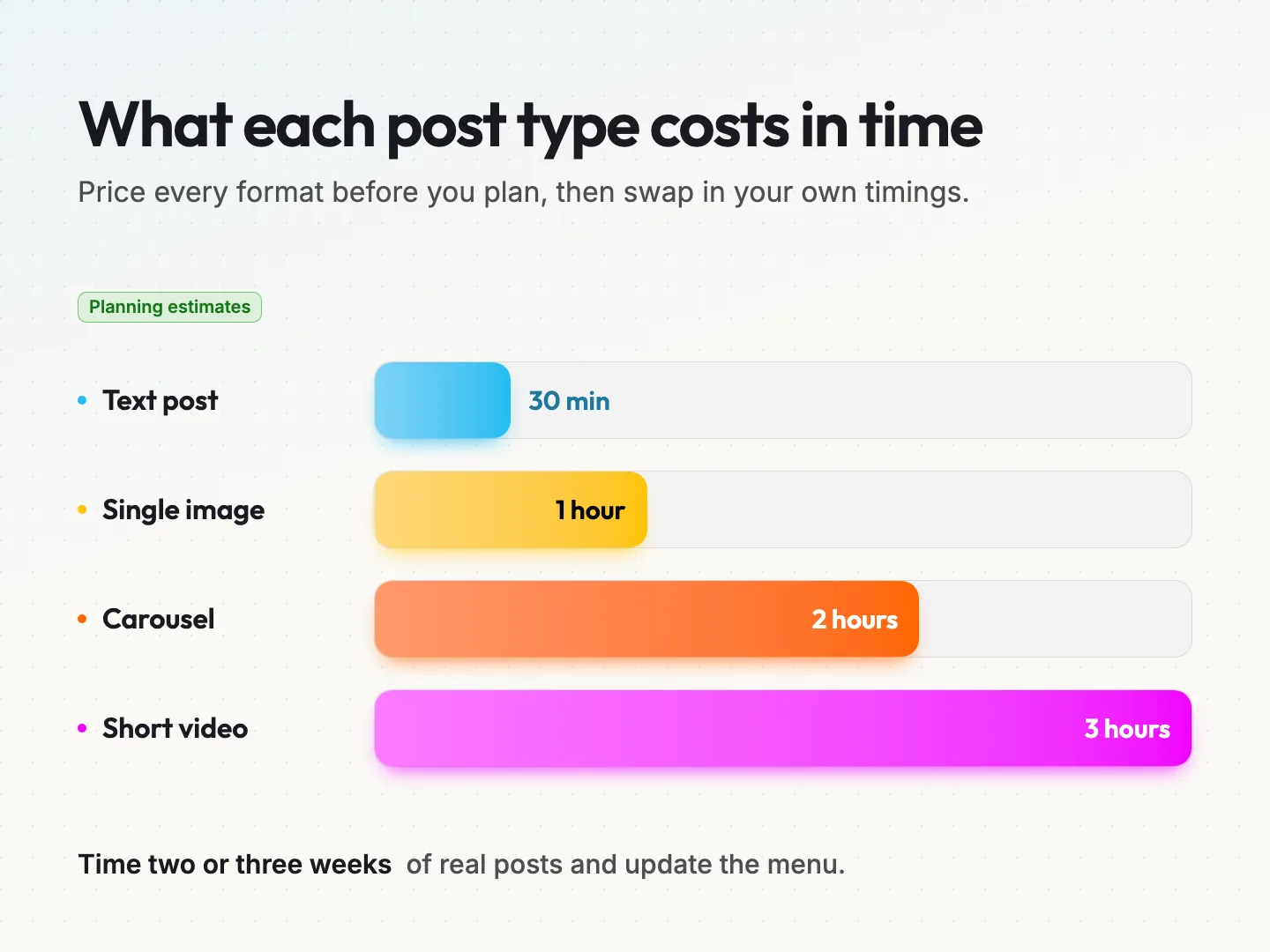
Here are planning assumptions for a hypothetical small team, covering writing, visuals and scheduling. They are starting estimates, not benchmarks. Replace them with your own timings after two or three weeks.
| Post type | What it involves | Planning estimate |
|---|---|---|
| Text post | A caption with a link or question | 30 minutes |
| Single image post | A caption plus one designed or edited image | 1 hour |
| Carousel | A caption plus 5 to 8 slides that explain one idea | 2 hours |
| Short video | A script, filming, editing and captions | 3 hours |
A carousel is a post made of several swipeable slides. It suits step-by-step tips and before and after examples, which is why it costs more time than a single image.
To time your own posts, write down the start and end time for each one over two weeks. Include the small jobs people forget, such as resizing an image or hunting for the right link. Your real numbers will beat any estimate in an article, including this one.
If design is the slow step, a set of reusable templates for quotes, tips and announcements cuts the image time sharply. Some teams hand that part to a social media graphics service so the in-house time goes to copy and replies.
Turn your hours into a weekly post count.
Now the math is simple. Take your weekly hours, subtract the reserves and divide what is left among the post types you want.
Hours for making posts equal your weekly hours minus the replies, planning, review and results reserves.
Here is the math in the hypothetical example.
- Weekly hours: 6.
- Reserves: 2.5 hours.
- Hours for making posts: 3.5.
- One carousel (2 hours), one single image post (1 hour) and one text post (30 minutes) use exactly 3.5 hours.
- The weekly post count is 3.
Three posts a week, each finished and reviewed, with replies covered. That is a plan the office manager can finish. Seven posts would need at least two more hours a week, and those hours do not exist.
You can change the mix without changing the hours. Swap the carousel for two single image posts and you still use 3.5 hours, but you publish 4 posts. Drop the image post for a short video and you need more time than you have. The menu makes those trade-offs visible before the week starts.
If the count comes out at one or two, that is fine. One useful post a week, every week, beats a burst of daily posting that stops after two weeks. Grow the count only when the plan has held for a month.
Posts per week according to published guidance.
You will find many frequency targets online. Two sources are worth knowing, along with their limits.
Buffer’s guide to posting frequency, published January 13, 2026, suggests 3 to 5 Instagram posts a week and 2 to 5 LinkedIn posts a week.
The same guide reports that Instagram accounts posting 3 to 5 times a week saw about 12% more reach per post than accounts posting 1 to 2 times. Buffer sells a scheduling tool, and the guide does not state the sample size behind that figure. Treat it as a direction, not a target.
The SBA blog post on setting up a social media calendar, written by Anita Campbell and published April 20, 2017, takes a time-first view.
It suggests about an hour a week to write and schedule the next seven days of posts, 15 minutes each weekday for replies and 15 minutes a week for analytics. That adds up to about 2 to 3 hours a week. The post is older and gives the hours as an example, not a measured standard.
Neither source knows your team. Use the ranges as a ceiling to grow toward, and use your own hours as the floor you plan from. If your capacity math says 3 and a guide says 5, plan 3 and earn the other two.
Pick a weekly rhythm and a content mix you can repeat.
A repeatable mix saves you from starting every week with a blank page. Give each post a job and keep the jobs the same from week to week. Three jobs cover most small businesses.
One anchor post a week.
An anchor post is the most useful post of the week. It answers a real customer question, shows a finished job or explains how something works. It usually takes the most time, so it gets the biggest slice of your hours. In the hypothetical week, the carousel is the anchor.
Repurposed posts from work you already have.
Repurposing means turning something you already made into a social post. A blog article, a customer question from email or a job photo can each become a post in less time than starting fresh. The guide on running a social content sprint shows how to pull several posts from one article.
Conversation posts that invite replies.
A conversation post asks your audience something they can answer easily. Which of two options do they prefer? What question do they have about a service? These posts are quick to make, but they create reply work, so place them on days when someone can answer within a few hours.
Keep the same days for the same jobs. In the hypothetical week, the anchor goes out on Tuesday, the repurposed post on Wednesday and the conversation post on Thursday. Followers learn the rhythm, and so does your team.
Write the full copy into every row before the week starts.
Most content calendars hold topics. “Tuesday: spring maintenance tips.” That is a reminder, not a plan. The real work, writing the caption and choosing the image, still happens on Tuesday morning, when there is no time left to review it.
A plan that works holds the finished post. Every row has the full caption as it will appear, the final image or a link to it, and the exact link the post sends people to. The reviewer reads the real thing, not a topic, so feedback arrives while there is still time to act on it.
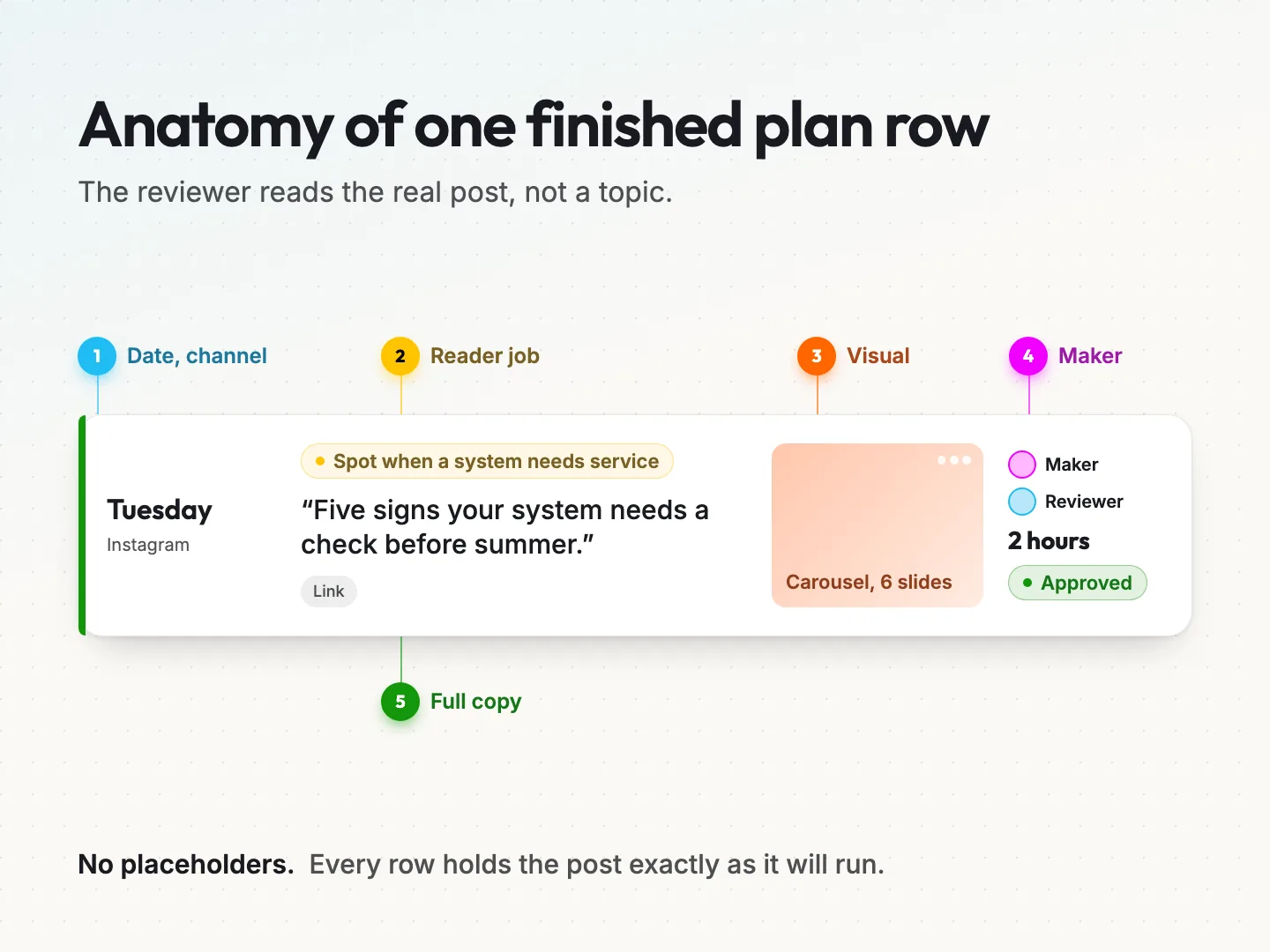
Each row needs these fields.
- Date and channel. When the post goes out and where.
- Reader job. What the post helps someone do, in one line. “Decide whether a filter needs changing” is a reader job. “Awareness” is not.
- Full copy. The caption, word for word, including the call to action.
- Visual. The final file or a link to it.
- Link. The exact page the post points to, if any.
- Maker. The person who writes and builds the post.
- Reviewer. The person who approves it.
- Hours. The estimate from your post cost menu.
- Status. Draft, in review, approved or scheduled.
The reader job field matters more than it looks. If you cannot say what the post helps someone do, the post probably should not run. That one line also makes the caption easier to write, because you know what it has to accomplish.
The weekly plan sheet you can copy.
Here is the plan sheet as plain tables you can paste into a spreadsheet or a shared document. Fill the capacity box first, then the rows. If you prefer a ready-made file, the free content calendar template gives you a spreadsheet to start from.
Capacity box.
| Line | Your number |
|---|---|
| Weekly hours for social media | |
| Replies reserve | |
| Planning reserve | |
| Review reserve | |
| Results reserve | |
| Hours left for making posts | |
| Posts that fit this week |
Post rows.
| Date | Channel | Reader job | Full copy | Visual | Link | Maker | Reviewer | Hours | Status |
|---|
A filled hypothetical week.
This is the same hypothetical home services business, with 3.5 hours for making posts. The captions are shortened here to keep the table readable. In your sheet, paste the full caption.
| Date | Channel | Reader job | Full copy (start) | Visual | Hours | Status |
|---|---|---|---|---|---|---|
| Tuesday | Spot when a system needs service | “Five signs your system needs a check before summer.” | Carousel, 6 slides | 2 | Approved | |
| Wednesday | Learn from a common customer question | “A customer asked us this week how often filters need changing.” | Single image | 1 | In review | |
| Thursday | Tell us what you want to know | “What is one question about home maintenance you have never asked?” | None | 0.5 | Draft |
Ready-to-schedule checklist.
Run every row through this list before it goes into the scheduler.
- [ ] The reader job is clear in one line.
- [ ] The full caption is written, with no placeholders.
- [ ] Prices, dates and phone numbers are checked against the source.
- [ ] The link opens the right page on a phone.
- [ ] The visual is final and sized for the channel.
- [ ] The reviewer has approved the exact copy and visual.
- [ ] Someone is free to answer replies in the hours after it goes live.
Run the week on a five-day production rhythm.
A plan sheet needs a routine around it. Without fixed days, planning drifts into the week it was meant to prepare. A five-day rhythm gives each job a home.
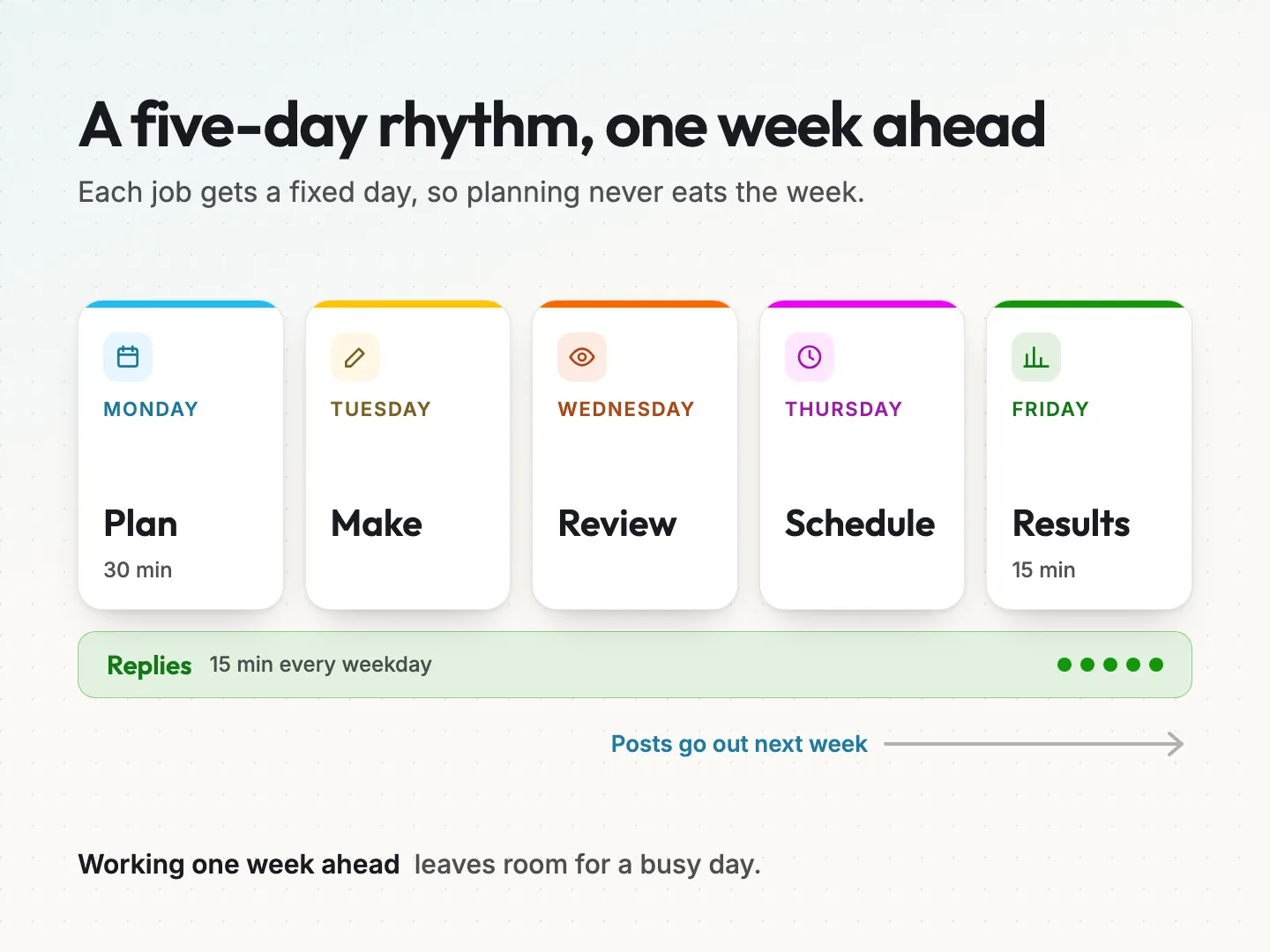
In the hypothetical team, the week runs like this.
- Monday: plan. Spend 30 minutes filling next week’s capacity box and rows.
- Tuesday: make. Write the captions and build the visuals for next week.
- Wednesday: review. The owner reads every row and approves or asks for changes.
- Thursday: schedule. Load the approved posts into your scheduling tool.
- Friday: results. Spend 15 minutes on this week’s numbers and note what to change.
Replies run every weekday for about 15 minutes, separate from the five jobs. Notice that the team works one week ahead. The posts made on Tuesday go out the following week, which leaves room for a sick day or a busy job without breaking the plan.
If one week ahead feels hard at first, start with a half week. Plan Monday for Thursday and Friday, then close the gap over a month. A longer production approach, with batching across several weeks, is set out in the social content sprint playbook.
Keep review short and replies protected.
Review is where many weekly plans stall. The owner gets the posts late, reads them between jobs and sends changes on the day they are due to go out. The fix is to give review its own fixed slot and its own simple rules.
Three rules keep review quick.
- One reviewer per post. Two reviewers mean two rounds of changes.
- Review the full copy, not a topic. The plan sheet already makes this possible.
- Clear outcomes only. Approved, approved with a named change, or held for next week.
If more people need to see posts, or if you work with an outside team, write down each review role and handoff.
Replies need the same protection. When a busy week squeezes the hours, cut a post before you cut reply time. An unanswered question from a ready customer costs more than a missing post. In the hypothetical example, dropping the text post frees 30 minutes without touching the 75 minutes of replies.
Common reasons a weekly plan slips and how to fix them.
Even a well-sized plan slips sometimes. The useful move is to name the cause, because each one has a different fix. These are the four causes small teams run into most often.
- The estimate was wrong. A post took twice as long as the menu said. Update the menu and plan one fewer post next week.
- Review came too late. The approver saw the post on the day it was due. Move review to its fixed slot and stop scheduling anything unapproved.
- A busy week ate the hours. Customer work always wins, and it should. Keep one evergreen post approved and waiting, so a slow week still has something ready.
- The copy started from nothing. Blank-page posts take the longest. Pull more posts from material you already have, such as answered emails and finished jobs.
One slipped week is information, not failure. Two slipped weeks in a row mean the plan is too big for your hours, so make it smaller.
Review the week in 15 minutes and resize the next one.
The Friday results slot closes the loop. You are not writing a report. You are answering three questions that size next week.
- Did every planned post go out? If not, which step ran out of time?
- Did the time estimates hold? If the carousel took 3 hours instead of 2, update the menu.
- Which post started conversations or clicks? Do more of that job next week.
Pick one or two numbers per channel and watch them over a month, not a day. Saves, replies and link clicks usually tell a small business more than follower counts. The guide to choosing content metrics explains which numbers suit which goals.
Then resize. If the week ran smoothly for four weeks in a row, add one post. If posts slipped two weeks running, remove one or swap a heavy format for a lighter one. The plan should follow your real capacity, not the other way around.
Final thoughts.
A weekly social media content plan only helps if your team can finish it. Size it from your real hours, reserve time for replies and review first, price each post by format and write the full copy into every row before the week begins. Three finished posts that someone has checked will do more for your business than seven rushed ones.
Start small this week. Fill the capacity box, plan two or three posts and run the five-day rhythm once. Adjust the numbers on Friday.
If you would rather hand part of the work to a team that plans, writes and designs posts for you, look at our social media management service. To work out what your week should hold, talk to a specialist and bring your capacity box with you.
Was this article helpful?
