



The best CRM for customer retention is the one that runs your follow-up after the sale without anyone remembering to do it. For most small teams that means HubSpot for an all-in-one record, Pipedrive for activity-led follow-up, Zoho CRM for budget and custom rules, Freshsales for sales context or Salesforce for complex ownership.
A CRM, short for customer relationship management software, keeps every conversation, purchase and follow-up with a customer in one shared record. Customer retention is the share of customers who keep buying from you over a period. The software does not keep anyone on its own. The follow-up workflow you build inside it does.
This guide compares five CRMs on the work that keeps customers, shows you how to map your own retention workflow first and gives you the formulas to check whether anything improved. Every capability claim links to the vendor’s own documentation, and prices link to the vendor’s pricing page because they change often.
Four capabilities that make a CRM good at retention.
Most CRMs were built to win new deals. Retention asks a different question: what happens after someone becomes a customer? Four capabilities decide whether a CRM helps you keep people.
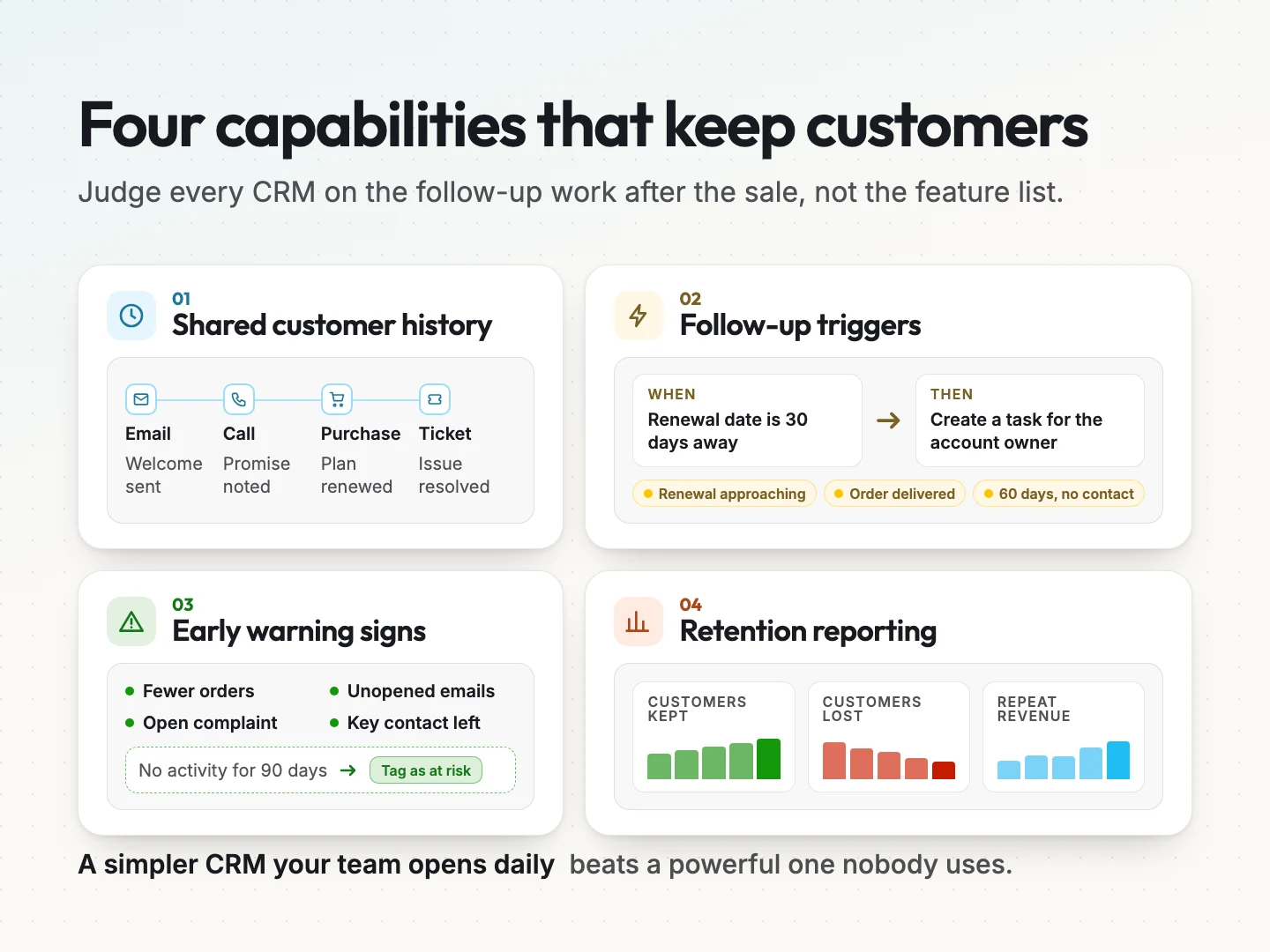
A shared customer history everyone can read.
Retention breaks down when the person answering a customer cannot see what happened last time. A good retention CRM shows emails, calls, purchases, support tickets and notes on one timeline. Anyone who picks up the account can see the last promise made and whether it was kept.
Follow-up triggers that run on dates and events.
Customers drift when check-ins depend on memory. Look for automation that creates a task or sends a message when something happens, such as a renewal date approaching, an order being delivered or 60 days passing without contact. This is often called workflow automation.
Early warning signs (health signals).
An early warning sign is any change that suggests a customer may leave. Examples include fewer orders, unopened emails, an unresolved complaint or a key contact leaving. Some CRMs score these signals for you. Others let you build a simple rule, such as tagging any customer with no activity for 90 days.
Retention reporting you will check every month.
You need to see retention numbers without exporting spreadsheets. At minimum, the CRM should report how many customers you kept, how many left and how much repeat revenue came in over a period. The measurement section below covers the formulas behind those numbers.
Features beyond these four can be useful. They rarely decide whether customers stay. A simpler CRM your team opens every day usually beats a powerful one nobody opens.
Map your retention workflow before comparing CRMs.
Pick the CRM after you know the job it has to do. Write down the moments after a sale when a customer needs to hear from you, and who is responsible at each one. That list becomes your test for every tool.
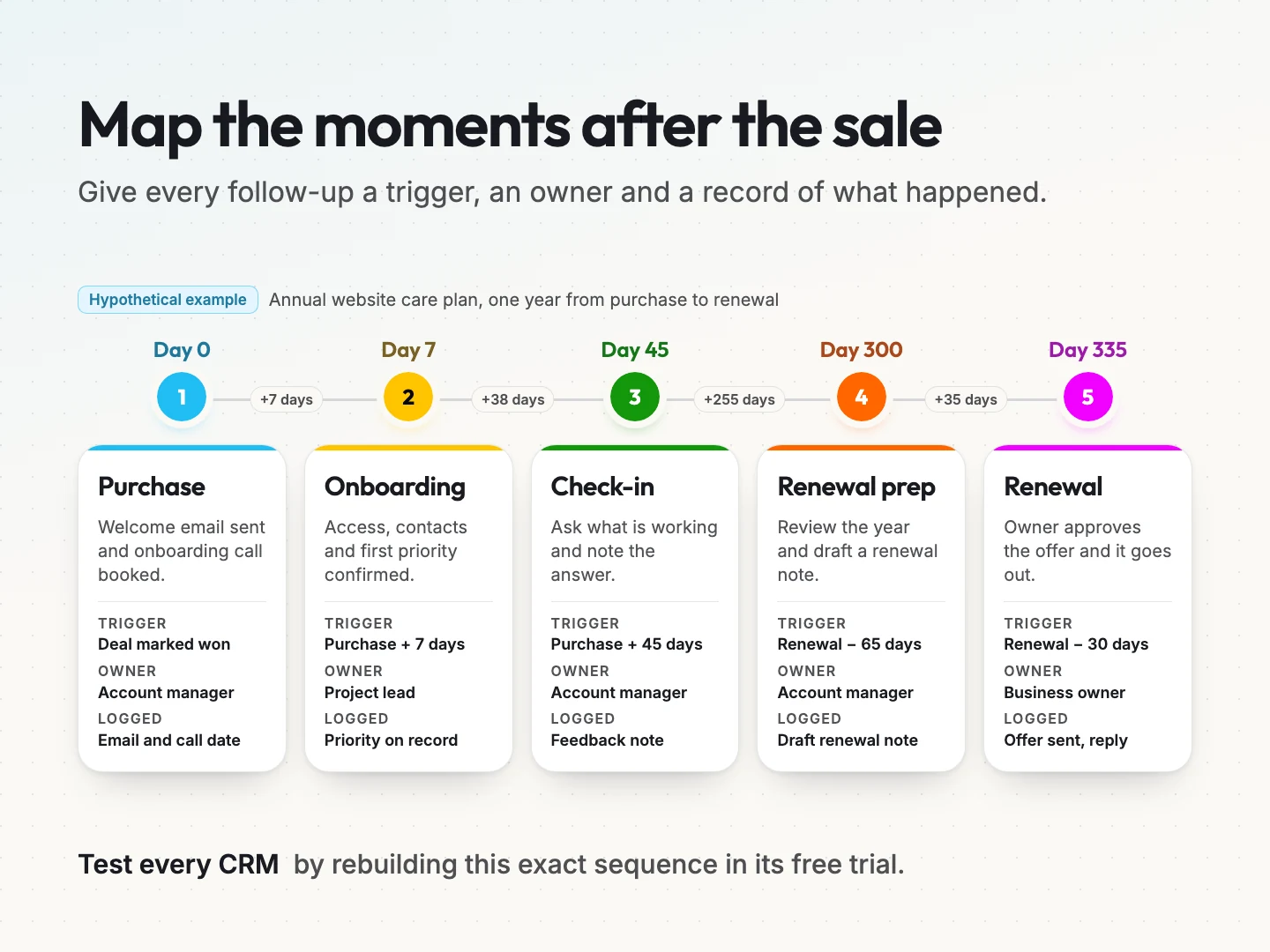
Example one: a service business with annual renewals.
Here is a hypothetical example for a small service business that sells annual website care plans.
- Day 0, purchase. The account manager sends a welcome email and books an onboarding call.
- Day 7, onboarding. The project lead confirms access, contacts and the first priority.
- Day 45, first check-in. The account manager asks what is working and logs the answer.
- Day 300, renewal prep. The account manager reviews the year and drafts a renewal note.
- Day 335, renewal. The owner approves the renewal offer and the account manager sends it.
Each step has a trigger, an owner and a record of what happened. When you test a CRM, recreate this exact sequence. Can it create each task automatically? Can the owner see the history before the call? Can you report on how many renewals came back?
Example two: an online store that wants repeat orders.
Retention looks different when customers buy products instead of contracts. Here is a hypothetical sequence for a small online store selling refillable products.
- Order delivered. The CRM sends a short how-to-use email and logs the delivery date.
- Day 14. A review request goes out, and any low rating creates a task for the owner.
- Day 30. A refill reminder goes to customers who have not reordered.
- Day 60 with no order. The customer is tagged as an early warning case and gets a personal note.
The trigger here is the order date, not a renewal date. That difference matters when you test tools. Some CRMs handle date-based triggers easily, while others need a connection to your store platform first.
Questions to answer before any trial.
Write these answers down before you open a free trial.
- Which events start a follow-up, such as a purchase, a delivery, a date or a complaint?
- Who owns each follow-up, and who covers when they are away?
- Which channels do customers use to reach you, such as email, phone, chat or messaging apps?
- Which other tools must connect, such as your website forms, billing, email marketing or helpdesk?
- Which number will tell you retention improved?
The 5 best CRMs for customer retention, compared.
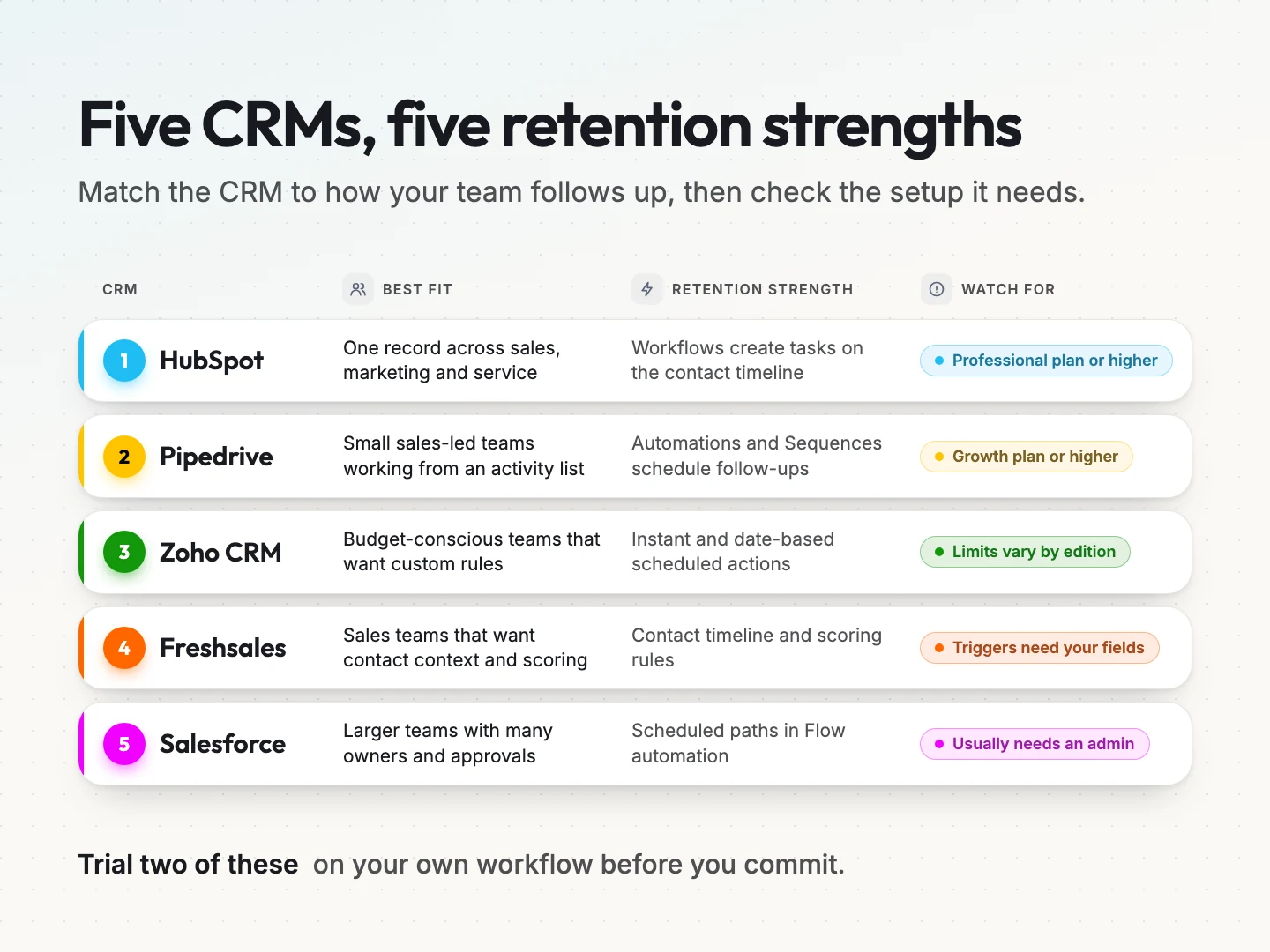
These five are common choices for small and mid-size teams, and each one supports the four retention capabilities in a different way. The comparison focuses on the follow-up work, not the full feature list.
| CRM | Best fit | Retention strength | Watch for |
|---|---|---|---|
| HubSpot | Teams wanting one record across sales, marketing and service | Workflows create follow-up tasks on the contact timeline | Task automation needs a Professional plan or higher |
| Pipedrive | Small sales-led teams that work from an activity list | Automations and Sequences schedule follow-up activities | Automations need the Growth plan or higher |
| Zoho CRM | Budget-conscious teams that want custom rules | Workflow rules with instant and date-based scheduled actions | Rule and action limits vary by edition |
| Freshsales | Sales teams that want contact context and scoring | Contact timeline, workflows and score-based automation | Workflow conditions only fire on the fields you add |
| Salesforce Sales Cloud | Larger or complex teams with many owners | Flow automation with scheduled follow-up paths | Setup usually needs an administrator |
HubSpot.
HubSpot keeps sales, marketing and service activity on one contact record, which suits teams where several people talk to the same customer. Its workflow actions can create tasks and notes automatically when a contact meets your criteria. HubSpot’s own documentation notes that creating tasks with workflows requires a Professional or Enterprise subscription.
For AI, HubSpot’s Breeze adds record summaries on all plans, so an owner sees recent activity before a check-in. The Customer Agent answers customer questions over chat and email and hands unclear conversations to a person. It needs a Professional or Enterprise hub and uses HubSpot credits.
To test it, build the day 45 check-in as a contact workflow that creates a task for the contact owner. Then open the contact and confirm the task appears on the timeline next to the original purchase. Check the current plans on HubSpot’s pricing page.
Pipedrive.
Pipedrive is built around activities, so every deal and customer has a next step on the calendar. Its automation templates can create a follow-up activity when another one is marked done, and Sequences run structured email and task cadences.
For AI, Pipedrive’s AI Sales Assistant reminds you about deals with no scheduled activity and suggests next steps. On Premium and Ultimate, Pipedrive AI also drafts emails and summarizes long threads. Pipedrive marks some of these features as beta.
To test it, mark an onboarding call as done and confirm the automation schedules the next check-in for the right owner. Pipedrive’s documentation states that Automations are available on the Growth plan and higher. Confirm the current tiers on Pipedrive’s pricing page.
Zoho CRM.
Zoho CRM gives you detailed control at a lower entry cost. Its workflow rules combine a trigger, a condition and an action, and an action can run instantly or on a schedule. That makes date-based check-ins straightforward to build.
For AI, Zoho’s Zia can predict customer churn and show the factors behind each score. Zoho limits churn prediction to Enterprise or Ultimate organizations with at least 20 user licenses. Zia’s anomaly detector flags unexpected drops, such as fewer deals than usual.
To test it, create a rule that runs a set number of days after a purchase date field and assigns a task. The tradeoff is setup effort, and rule limits depend on your edition. See the editions on Zoho’s pricing page.
Freshsales.
Freshsales shows a contact timeline with emails, calls, website visits and lifecycle changes in one place. Its workflows can create follow-up tasks, and it supports automation based on contact score, which helps you act on early warning signs.
For AI, Freshworks’ Freddy AI writes contact and account summaries before a follow-up call. Its deal insights and contact scoring point to cooling deals and likely buyers. Freshworks lists both on the Pro and Enterprise plans.
Freshsales documentation explains that when you add conditions to a workflow, only updates to those fields trigger it. To test it, change the exact field your rule depends on and confirm the task appears. Check plans on Freshworks’ pricing page.
Salesforce Sales Cloud.
Salesforce fits teams with many owners, territories or approval steps. Its Flow automation can create a task when a record changes and use a scheduled path to run that task days later, such as a check-in after a close date.
For AI, Einstein Activity Capture syncs email and calendar activity to records, and its Standard version is included from Starter. Opportunity scoring and Agentforce record summaries start at Enterprise, and Agentforce also needs an add-on.
To test it, ask your administrator to build one record-triggered flow for the renewal prep step and run it in a sandbox first. Most small teams need an administrator or partner to build and maintain flows. Review editions on Salesforce’s pricing page.
AI features for customer retention in each CRM.
Every CRM on this list now ships AI, but the useful parts for retention are narrower than the marketing suggests. The useful jobs are summaries before a follow-up, alerts when a customer goes quiet and drafts that a person edits before sending.
| CRM | AI assistant | What it does for retention | Plan noted by the vendor |
|---|---|---|---|
| HubSpot | Breeze | Record summaries and a Customer Agent that hands off to a person | Summaries on all plans. Customer Agent on Professional or higher with credits |
| Pipedrive | Pipedrive AI | Flags deals with no next step, drafts emails and summarizes threads | Sales Assistant on all plans in beta. Email AI on Premium and Ultimate |
| Zoho CRM | Zia | Churn prediction and anomaly alerts | Enterprise or Ultimate. Churn prediction needs 20 or more users |
| Freshsales | Freddy AI | Deal insights, contact scoring and record summaries | Insights and scoring on Pro and Enterprise |
| Salesforce Sales Cloud | Einstein and Agentforce | Activity capture, opportunity scoring and record summaries | Activity capture from Starter. Scoring and Agentforce from Enterprise |
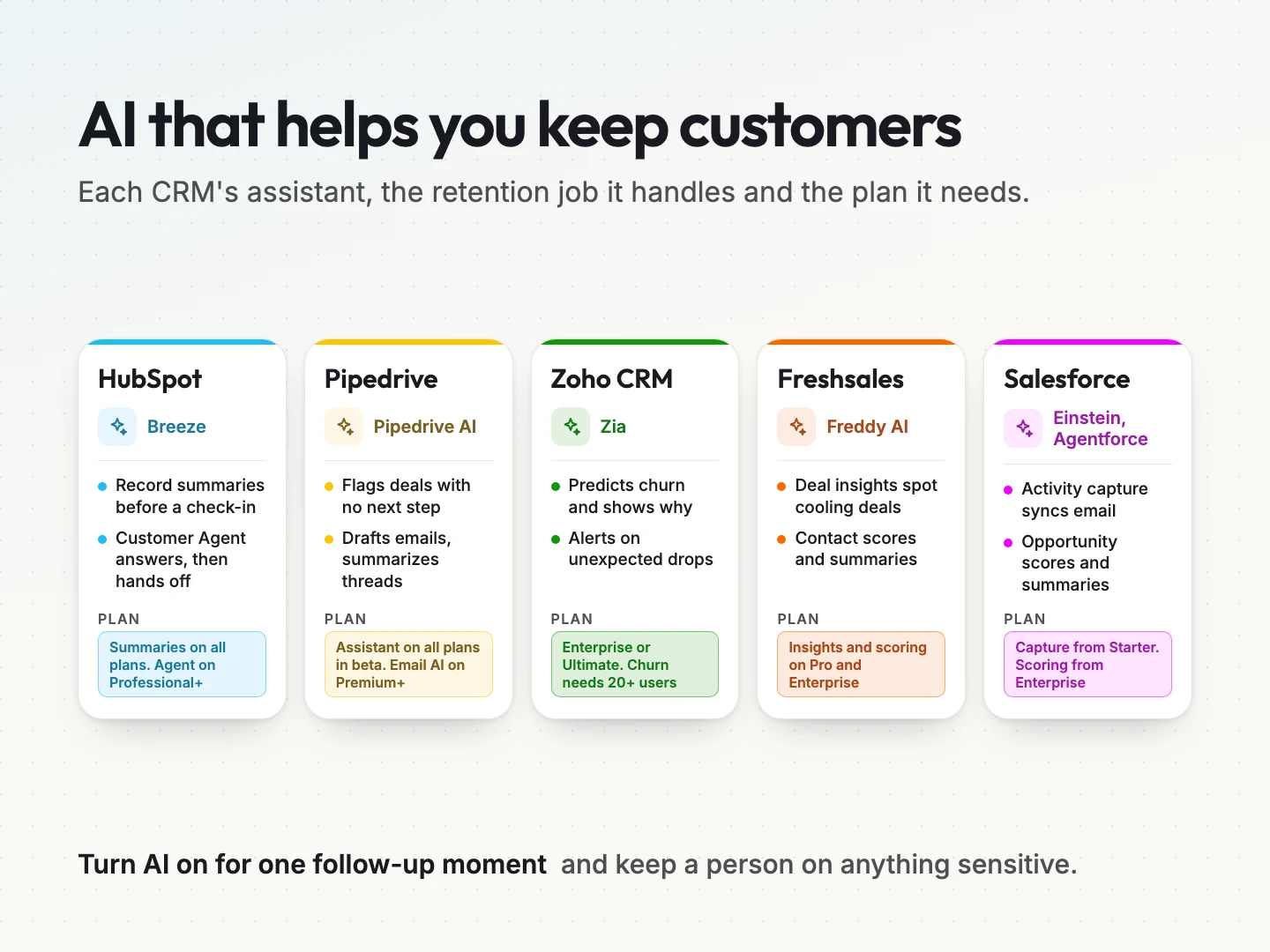
AI only helps once the follow-up workflow runs. Turn it on for one moment from your workflow map, check its suggestions against the record and keep a person on anything sensitive. Plans and names change often, so confirm them on each vendor’s pricing page before you buy.
Helpdesk or loyalty tools that fit better than a CRM.
A CRM manages relationships and follow-up. Some retention problems need a different tool alongside it.
- Support quality drives churn. A helpdesk tracks tickets, response times and satisfaction more deeply than a CRM.
- Repeat purchases drive revenue. A loyalty or rewards tool gives customers a reason to come back.
- Product usage predicts churn. A product analytics tool shows which customers stopped using what they bought.
Start with the CRM as the shared record. Add a second tool only when your workflow map shows a gap the CRM cannot cover, and make sure the two connect so history stays in one place.
Choosing a CRM by business and workflow.
Company size matters less than how complex your follow-up is and who does it. Use this table as a starting shortlist, then test your own workflow.
| Your situation | Start your trial with |
|---|---|
| One or two people handle every customer and follow-ups are simple | Pipedrive or Zoho CRM |
| Sales, marketing and service all talk to the same customers | HubSpot |
| You want custom rules and have time to configure them | Zoho CRM |
| Sales reps need contact context and scoring to prioritize | Freshsales |
| Many owners, territories or approvals, with admin support | Salesforce Sales Cloud |
Run the same mapped workflow in two tools during their free trials. The one your team finishes faster, with fewer workarounds, is usually the right choice.
Clean and import your customer data first.
A retention CRM is only as useful as the records inside it. Importing a messy spreadsheet copies every duplicate and missing date into the new tool. A few hours of cleanup now saves weeks of confused follow-ups later.
Bring in these fields for every active customer.
- Name, company and best contact. One record per person, with duplicates merged.
- First purchase date and last purchase date. These drive most date-based follow-ups.
- Plan, product or service. This decides which sequence each customer joins.
- Owner. The person responsible for the relationship.
- Last contact date and channel. This shows who is already overdue.
- Email permission. Record whether each customer agreed to marketing email.
Leave out closed leads that never bought, old notes nobody reads and fields you cannot keep current. You can add history later. A small, accurate list lets your first automation work on day one.
Measuring whether your CRM improves retention.
Record a baseline before you switch tools or change workflows. Then review the same numbers every month. Four standard formulas cover most small businesses.
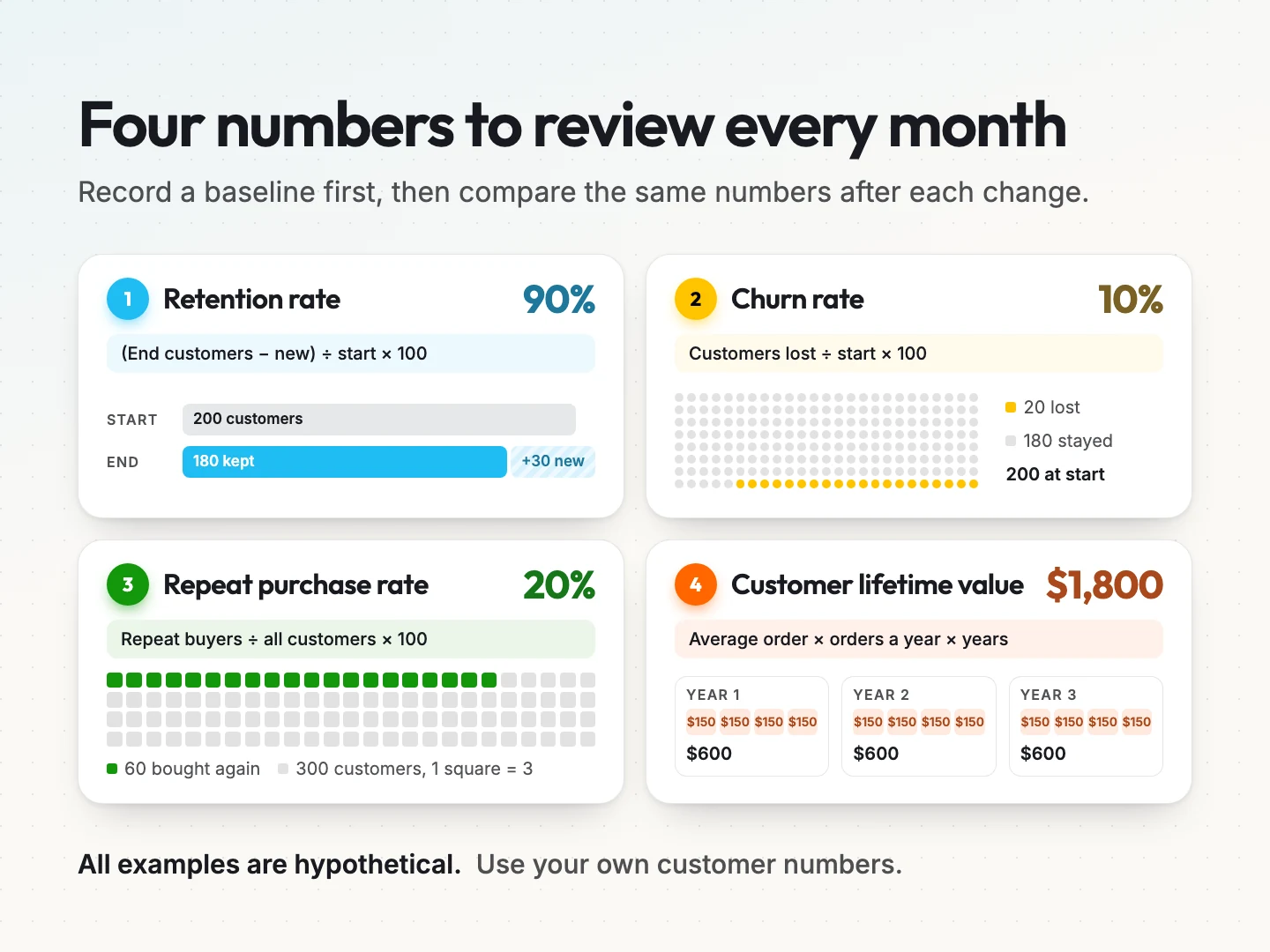
Customer retention rate and churn rate.
Customer retention rate shows the share of customers you kept over a period. Take the customers at the end of the period, subtract the new customers you added during it, divide by the customers you started with and multiply by 100.
Hypothetical example: you start a quarter with 200 customers, add 30 and end with 210. That is (210 minus 30) divided by 200, or 90 percent retention.
Churn rate is the opposite view. Divide the customers you lost during the period by the customers you started with and multiply by 100. In the same example, 20 customers left, so churn is 10 percent.
Repeat purchase rate and customer lifetime value.
Repeat purchase rate suits ecommerce and product businesses. Divide the customers who bought more than once by all customers in the period. If 60 of 300 customers bought again, the rate is 20 percent.
Customer lifetime value (CLV) estimates the revenue one customer brings over the relationship. A simple version multiplies the average order value by the purchases per year and by the average years a customer stays.
Hypothetical example: an average order of 150 dollars, four orders a year and three years as a customer gives a CLV of 1,800 dollars. Use your own numbers, not industry averages, because your pricing and customer mix are unique.
A monthly review that takes 20 minutes.
Put a recurring 20-minute review on the calendar with whoever owns retention. Look at the same four numbers each time and ask three questions.
- Did any follow-up step get skipped, and why?
- Which customers showed early warning signs, and did someone contact them?
- Did the customers who received every step stay longer than those who missed one?
Compare groups of customers who started in the same month, often called cohorts. A cohort view shows whether recent changes help newer customers, instead of mixing them with people who joined years ago.
Run a 30-day CRM retention pilot.
You do not need a full migration to learn whether a CRM fits. A 30-day pilot on one follow-up moment gives you real evidence.
- Pick one moment. Choose the step from your workflow map that most often gets missed, such as the 45-day check-in.
- Record the baseline. Count how many of those check-ins happened last month and how many customers came back.
- Import a small, clean list. Bring in only the customers affected by that moment, with their last contact date and owner.
- Build one automation. Create the trigger, the task and the owner for that single moment.
- Run it for 30 days. Let the CRM create the tasks and have owners log every outcome on the record.
- Compare the numbers. Check completed check-ins, replies and any renewals or repeat orders against the baseline.
- Decide. If the follow-up happened reliably and the team kept using the tool, expand to the next moment.
Keep the pilot narrow. One moment that runs every time teaches you more than ten automations that half work.
Common CRM retention mistakes to avoid.
Most retention setups fail for the same few reasons. Watch for these during your pilot.
- Automating before mapping. Building workflows before agreeing on the follow-up moments creates tasks nobody owns.
- No owner on the record. A task assigned to a shared inbox tends to wait for someone else.
- Too many sequences at once. Customers who receive three overlapping campaigns stop reading all of them.
- Messages that ignore history. A cheerful check-in sent the day after a complaint does more harm than silence.
- Measuring activity instead of outcomes. Emails sent is not retention. Track who stayed and who bought again.
Fix these first. A simple CRM set up with care often keeps more customers than an advanced one set up in a rush.
Automation and AI agents that help retention.
Once your follow-up workflow runs reliably, automation and AI agents can take on the repetitive parts. They work best on clear, routine tasks with a person reviewing anything unusual. These are good candidates.
- Routine reminders. Renewal notices, delivery check-ins and appointment confirmations sent on schedule.
- Enquiry triage. An AI agent reads incoming messages, answers common questions and routes the rest to the right owner.
- Follow-up drafts. AI drafts a check-in email from the customer’s history for the owner to edit and send.
- Early warning alerts. A rule flags customers with no activity or an open complaint so a person calls them.
Keep a person in charge of pricing changes, complaints, cancellations and anything that needs judgment. Customers notice when a message ignores what they said last time, so every automated step should read from the shared history.
Scayver Graphix sets up CRM automation and AI lead management automation for follow-up workflows like these. For support-heavy businesses, AI customer support automation routes routine questions while people handle exceptions. Your retention emails can also run through email marketing connected to the same record.
Final thoughts on choosing a retention CRM.
The right CRM for customer retention is the one that makes your follow-up happen every time. Map the moments after a sale first, then test two tools on that exact sequence. Measure your baseline, run a short pilot and expand only what works.
Features and brand names matter less than a team that opens the CRM every day. Choose the tool your people will use, give every follow-up an owner and let automation handle the routine parts.
If you want help mapping your retention workflow and building the automations inside your CRM, talk to a specialist about your follow-up process.
Was this article helpful?